
Your RAM may soon have a new job.
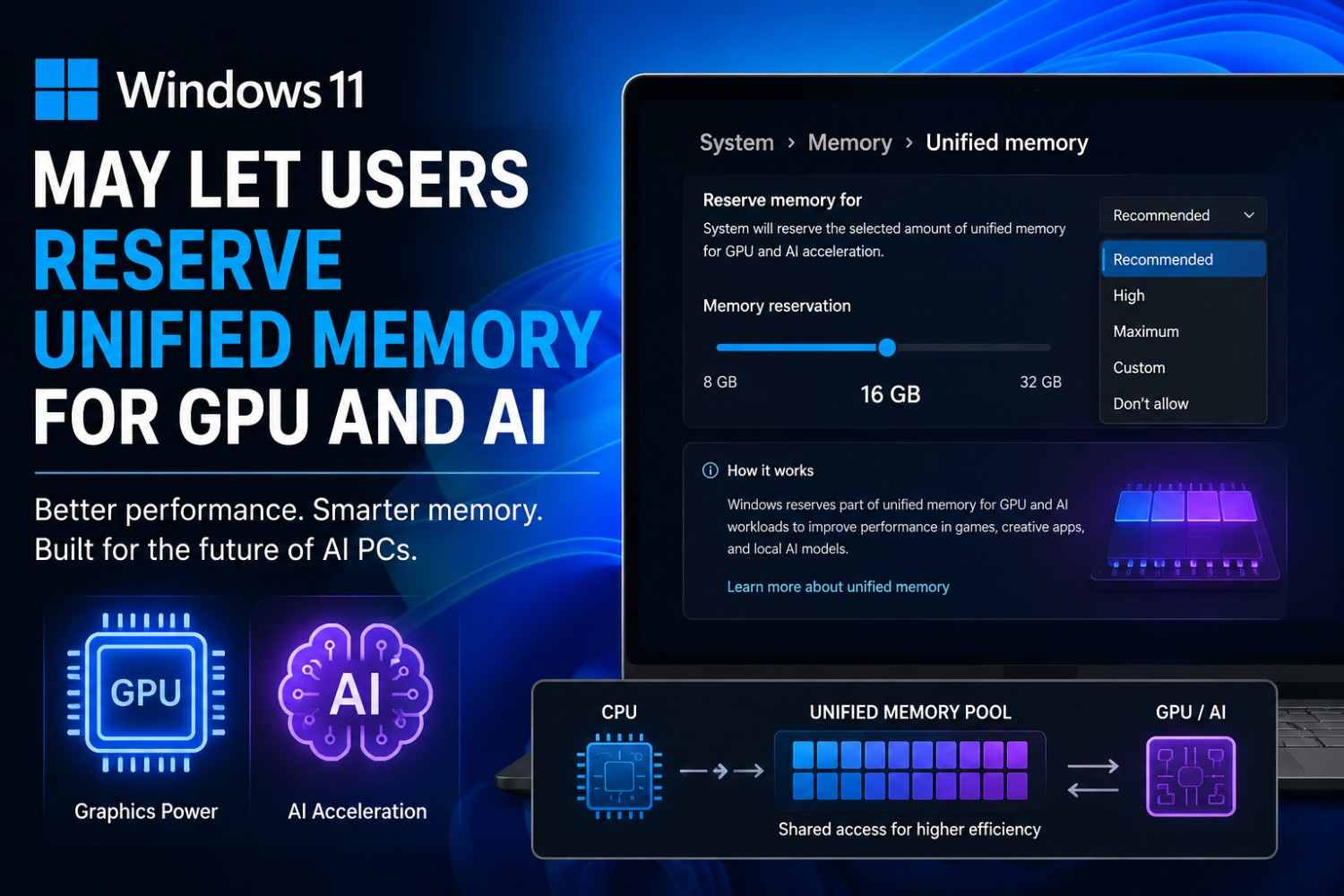
Microsoft appears to be testing a Windows 11 feature that could let users decide how much unified memory should be reserved for graphics and AI workloads.
The feature is particularly interesting for newer AI PCs and systems where the CPU, GPU and AI accelerators share the same physical memory pool.
Unlike traditional PCs with separate system RAM and dedicated GPU VRAM, unified-memory machines can make a large pool of memory available to multiple processors. That flexibility is useful for local AI models, demanding games and graphics-heavy applications—but it can also create competition for memory.
Windows 11 may soon give users more control over that trade-off.
Recent Windows 11 preview builds reportedly contain a hidden feature called IntelligentCarveout, along with references to “Reserved memory for accelerators” and “Memory for graphics and AI acceleration.”
What exactly is Windows 11 testing?
The feature was spotted in Windows 11 Build 29648.1000, released on August 17, 2026.
According to reports examining the preview build, Microsoft included:
- IntelligentCarveout as the internal feature name
- Feature ID 61121285
- A new
SettingsHandlers_UnifiedMemory.dll - References to reserved memory for accelerators
- A setting related to memory for graphics and AI acceleration
The wording found in the build suggests that Windows could reserve additional unified memory for graphics and AI-intensive games and applications.
That doesn’t mean the feature is ready for everyone.
Microsoft has not officially announced a public release date, and the functionality remains hidden in a preview build.
That’s an important distinction. This is evidence of development, not confirmation that every Windows 11 PC will receive the setting.
Why does unified memory matter?
Think of traditional PC memory as two separate rooms.
Your CPU and Windows applications mainly use system RAM, while a dedicated graphics card has its own VRAM.
A unified-memory design is more like one large room shared by the CPU, GPU and other accelerators.
This can be extremely useful for AI.
A local AI model may need a large amount of memory to hold model weights, intermediate data and other working buffers. If the GPU doesn’t have enough dedicated VRAM, unified memory can potentially provide a much larger pool.
Microsoft’s Windows AI architecture already supports hardware-accelerated AI execution across CPUs, GPUs and NPUs through hardware-specific execution providers.
The catch is simple:
Everyone is using the same memory.
Your browser, Windows, game, AI model and GPU may all want access to it at the same time.
That’s where Microsoft’s proposed reservation system becomes interesting.
What would the new memory reservation actually do?
The simplest way to understand it is to imagine a 64GB unified-memory PC.
Without a reservation, Windows can dynamically manage memory depending on workload requirements.
With the proposed system, a user could potentially tell Windows:
Keep a certain amount of this memory available for graphics and AI acceleration.
That reserved portion would then be unavailable to normal applications.
Reports indicate that early versions of the feature include options such as Recommended, High, Maximum, Custom and Don’t allow, although these choices could change before release.
The idea is surprisingly practical.
For gaming
A user could reserve more memory for graphics when running a demanding game.
For local AI
Someone running an AI model through applications such as local LLM software could prioritize accelerator memory.
For everyday work
A user who mainly uses Chrome, Office, Photoshop or other conventional applications could reduce the reservation and leave more memory available for Windows and regular programs.
That’s the real attraction here: one machine could be configured differently depending on the workload.
How is this different from “Shared GPU Memory” in Task Manager?
This is where things can get confusing.
Windows already shows Shared GPU Memory in Task Manager.
But shared GPU memory isn’t necessarily the same thing as the proposed unified-memory reservation.
Windows already has sophisticated GPU memory-management mechanisms. Microsoft documents GPU memory budgets and reservation APIs that allow applications and drivers to communicate memory requirements to the operating system.
The proposed IntelligentCarveout appears to be more user-facing.
Instead of simply allowing the GPU to use available system memory when necessary, Windows could create a deliberate reservation for graphics and AI workloads.
In simple terms:
Shared memory:
Windows can make system memory available to the GPU when required.
Reserved unified memory:
Windows sets aside part of the shared pool specifically for accelerator workloads.
That difference could matter when a system is under heavy memory pressure.

Who could benefit the most?
Not every Windows 11 user needs this.
The feature makes much more sense on PCs built around unified-memory architectures.
Potential beneficiaries include:
- AI PCs with NPUs
- High-memory Copilot+ PCs
- Systems with powerful integrated GPUs
- AMD Ryzen AI Max-class systems
- Emerging workstation platforms using shared CPU/GPU memory
- PCs designed for local AI inference
- Gaming systems that rely heavily on shared memory
AMD’s Ryzen AI Max family is one example of hardware where large amounts of system memory can play a much bigger role in GPU workloads.
NVIDIA is also pushing unified-memory concepts with newer platforms. Recent reporting specifically connects Microsoft’s work with NVIDIA’s RTX Spark platform.
For an ordinary laptop with 16GB RAM and a separate NVIDIA GPU containing dedicated VRAM, however, this feature may be far less relevant.
Why this could be a big deal for local AI
This is the part I’m watching most closely.
I’ve spent enough time testing laptops and software to see the same problem repeatedly: AI workloads can consume memory much faster than ordinary applications.
You can have a perfectly capable processor and a fast SSD, but if the AI model doesn’t have enough usable memory, performance can suffer.
A unified-memory architecture changes the equation.
Instead of asking:
“How much VRAM does my GPU have?”
you increasingly need to ask:
“How much high-bandwidth memory can the entire system make available to the accelerator?”
That’s a very different way of thinking about PC hardware.
Microsoft’s own Windows AI documentation shows how modern AI workloads can be distributed across CPU, GPU and NPU hardware through hardware-specific execution providers.
A user-controlled memory reservation could therefore become another piece of the local-AI performance puzzle.
A simple real-world example
Imagine you’re using a 64GB unified-memory laptop.
During normal work, you might have:
- Chrome with many tabs
- Word
- Photoshop
- Spotify
- Several background applications
You probably don’t want Windows permanently reserving a huge chunk of RAM for the GPU and AI accelerator.
Now imagine the same laptop at night.
You close most applications and start running a large local AI model.
Suddenly, giving the accelerator a larger guaranteed memory pool makes much more sense.
The proposed feature could allow you to change that balance instead of relying entirely on automatic memory management.
That’s the scenario where I think this feature becomes genuinely useful.
Will reserving more memory make your PC faster?
Not automatically.
This is probably the biggest misconception to avoid.
If you reserve 16GB instead of 8GB, you haven’t magically created 8GB of additional RAM.
You’ve simply changed who gets priority access to part of the existing memory pool.
For an AI workload that was previously constrained by memory availability, that could help.
For ordinary desktop applications, it could actually make things worse because less memory remains available to them.
So the correct rule is:
More reserved memory ≠ more performance in every workload.
Performance depends on the application, memory bandwidth, GPU architecture, NPU capability, drivers and how efficiently the software uses the available memory.
What are the potential downsides?
There are several.
1. You lose flexibility
Reserved memory isn’t available to normal applications.
If you reserve too much, Windows and your other software have less memory to work with.
2. It won’t create extra VRAM
This is still the same physical memory pool.
The setting changes allocation and availability—not the physical amount of RAM installed.
3. Hardware support will matter
A desktop with a conventional CPU and discrete GPU may not benefit in the same way as a unified-memory AI PC.
4. Software optimization remains critical
A badly optimized AI application won’t suddenly become efficient because Windows reserves additional memory.
5. The feature isn’t finalized
The biggest limitation right now is availability.
The functionality has been discovered in an experimental Windows 11 build, but Microsoft hasn’t publicly confirmed that the exact feature will ship in this form.
Could this change how we buy AI PCs?
Potentially, yes.
For years, PC buyers have focused on:
- CPU cores
- GPU model
- VRAM
- RAM capacity
- SSD speed
AI PCs are adding another question:
How effectively can the system share and manage memory between CPU, GPU and NPU?
That could become increasingly important as local AI models become larger.
A laptop with 64GB of unified memory could potentially be more interesting for certain AI workloads than a machine with 32GB system RAM and a GPU with 8GB VRAM—even though those specifications look very different on paper.
But benchmarks will ultimately decide whether that theoretical advantage translates into real-world performance.
My take: this is more important than it looks
At first glance, a Windows memory slider doesn’t sound exciting.
I think it could become one of those small Windows features that matters much more to power users than it does to everyone else.
The PC industry is moving toward systems where CPU, GPU and NPU workloads increasingly overlap.
Windows therefore needs better ways to manage shared resources.
Microsoft already has sophisticated GPU memory-management infrastructure, including memory budgets and GPU isolation technologies.
Giving users a simple control over unified-memory reservation could make that complexity easier to manage.
For me, the most interesting part isn’t the slider itself.
It’s what the slider represents:
Windows is adapting to a PC world where AI is becoming a first-class workload.
Should you change unified-memory settings right now?
Not yet—unless you’re specifically experimenting with an Insider build and understand the risks.
This is still an unfinished feature.
For normal Windows 11 users, my recommendation is to leave memory management to Windows unless an official release provides the setting and you have a workload that genuinely benefits from changing it.
If Microsoft eventually ships the feature broadly, I’d start with Recommended rather than immediately choosing Maximum.
Then test your actual workload.
For example:
- Run your normal applications.
- Check memory usage.
- Run your local AI model or game.
- Monitor GPU and system-memory utilization.
- Compare performance with different reservation levels.
- Keep the setting that improves your workload without hurting everyday responsiveness.
That’s much better than assuming “more reserved memory = better PC.”
FAQs
What is unified memory in a Windows PC?
Unified memory is a shared memory pool that can be accessed by the CPU, GPU and other accelerators instead of maintaining completely separate pools for system RAM and graphics memory.
This architecture can be particularly useful for local AI and integrated GPU workloads.
What is Windows 11 IntelligentCarveout?
IntelligentCarveout is the reported internal name of a hidden Windows 11 feature found in preview build 29648.1000. It appears designed to reserve part of unified memory for graphics and AI acceleration.
Can I reserve GPU memory in Windows 11 right now?
The newly reported unified-memory control is not currently a normal Windows 11 setting for everyone. It has been discovered in an experimental preview build, and Microsoft has not confirmed a final public release.
Will this increase my PC’s RAM?
No.
The feature would manage the existing physical memory pool. It doesn’t add RAM or physically increase VRAM.
Will this improve gaming performance?
It could help some unified-memory systems by ensuring that graphics workloads have adequate memory available.
However, performance will depend heavily on the hardware, game engine, drivers and memory bandwidth. A larger reservation isn’t guaranteed to produce higher FPS.
Final Verdict
Windows 11’s proposed unified-memory control is a feature worth watching, especially if you’re interested in AI PCs and high-performance integrated graphics.
The concept is straightforward: reserve part of a shared memory pool for GPU and AI workloads when you need it, and give more memory back to regular applications when you don’t.
The feature is still experimental, so I wouldn’t make a buying decision based on it today.
But if Microsoft ships it successfully, it could make Windows 11 better suited to the next generation of AI-focused PCs.
And personally, I think that is the bigger story here.
The future of PC performance may not simply be about having more RAM. It may be about Windows becoming much smarter about deciding who gets to use it.
Sources & reporting context
The feature details are based on reporting about Windows 11 preview build 29648.1000 and Microsoft’s existing documentation around GPU memory management and Windows AI execution. Microsoft has not yet publicly confirmed the final consumer implementation or release date.