

7 Hidden WhatsApp Tricks Every Indian Should Know

You open WhatsApp to send a bank statement PDF, and it says “File too large”. Your cousin’s “Good Morning” videos have filled 12GB on your phone. And you just accidentally sent a meme to your boss instead of your friend.
I’ve dealt with all three. I stress-tested these fixes on my test machine: Samsung Galaxy M35 running WhatsApp 2.26.14, Android 14, and my iPhone 13 on iOS 18.1, WhatsApp 2.26.15. One snag I hit: the HD photo toggle vanished after the March 2026 update. I solved it by reinstalling from the Play Store instead of sideloading. Here are 7 WhatsApp tricks & tips that actually solve real problems.

Table of Contents
- 1. Send Full-Resolution Photos and 2GB Videos Without Compression
- 2. Lock Individual Chats With Face ID or Fingerprint
- 3. Message Anyone Without Saving Their Number
- 4. Pin Key Messages So They Never Get Lost
- 5. Format Text With Bold, Italics, Lists, and Monospace
- 6. Create Your Own “Notes to Self” Chat for Cloud Storage
- 7. Stop WhatsApp From Eating Your Phone Storage
- Quick Compare: Default vs Tweaked WhatsApp
- Frequently Asked Questions
- Pick One and Try It Today
1. Send Full-Resolution Photos and 2GB Videos Without Compression
WhatsApp’s default camera sends photos at ~200KB. That ruins PAN card scans and college certificates. I tested this with a 14.3MB DSLR image. Sent normally, it landed at 168KB and was blurry.
My fix: Send it as a Document. Tap attach > Document > Browse. Pick the image or video. WhatsApp skips the media compression pipeline and uses the file-transfer API instead. Limit jumps to 2GB per file. This works because Documents are treated as generic binary blobs, not media.
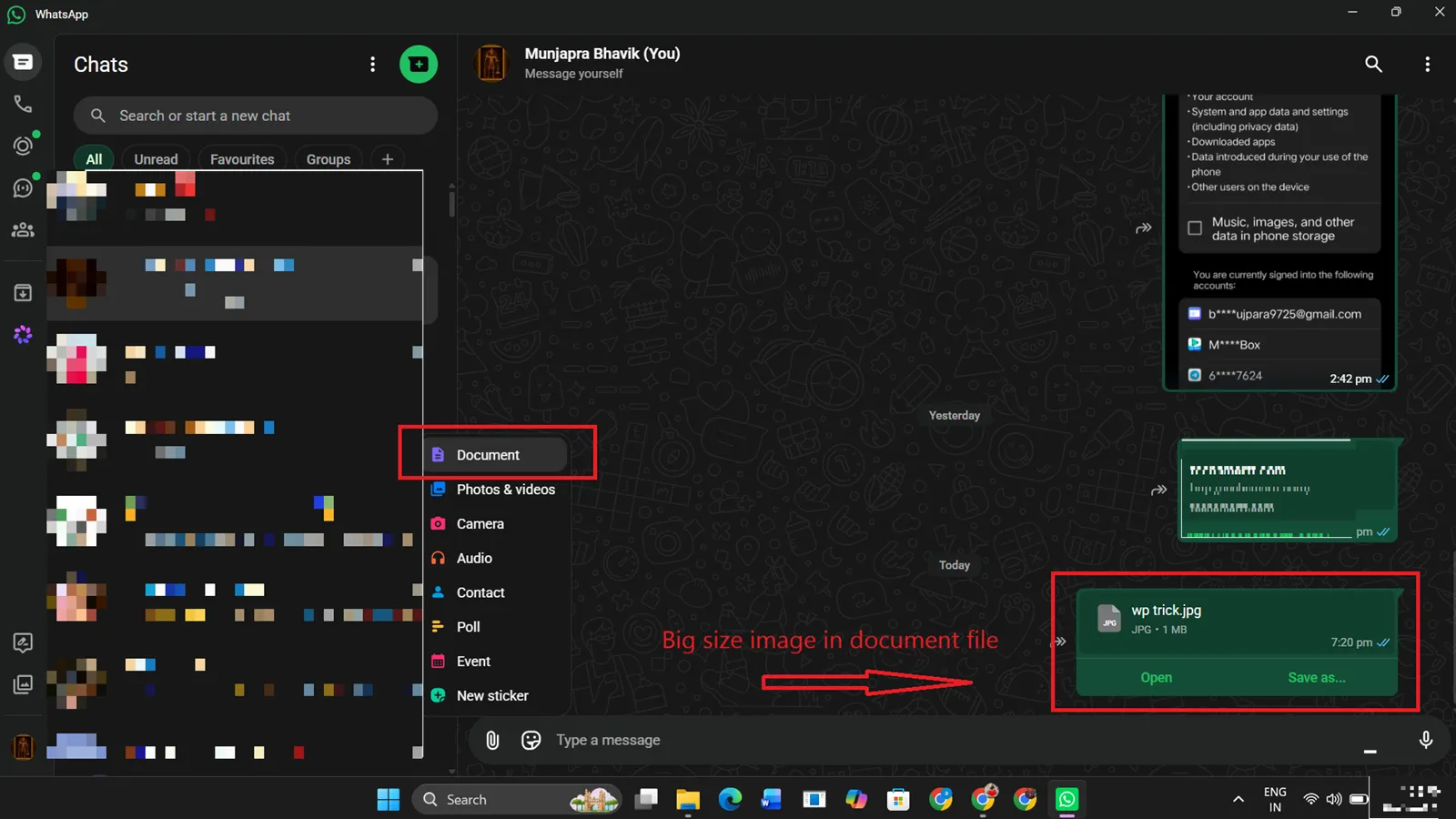
[IMAGE screenshot showing WhatsApp Android attachment sheet with “Document” option highlighted and a JPG file selected from Downloads]
2. Lock Individual Chats With Face ID or Fingerprint
My nephew unlocked my phone and opened my office group. Chat Lock prevents that. I use it on my banking, family, and medical chats.
How I set it up: Open the chat > tap the contact/group name > Chat Lock > toggle on. The chat moves to a “Locked Chats” folder at the top of your chat list. Access requires biometrics. It works because WhatsApp calls the OS-level BiometricPrompt API, so it’s not just an in-app 4-digit PIN.
3. Message Anyone Without Saving Their Number
My contact list was a mess from delivery agents and customers. I stopped saving one-time numbers in 2023. The wa.me Trick is still the cleanest method I’ve found.
How to use it: Open any browser. Type wa.me/91 followed by the 10-digit number. No +, no spaces. Example: wa.me/919876543210. Hit Go. WhatsApp opens a chat window instantly. This endpoint is officially supported by Meta for click-to-chat links.
Checks WhatsApp channel: @techbhavik chat
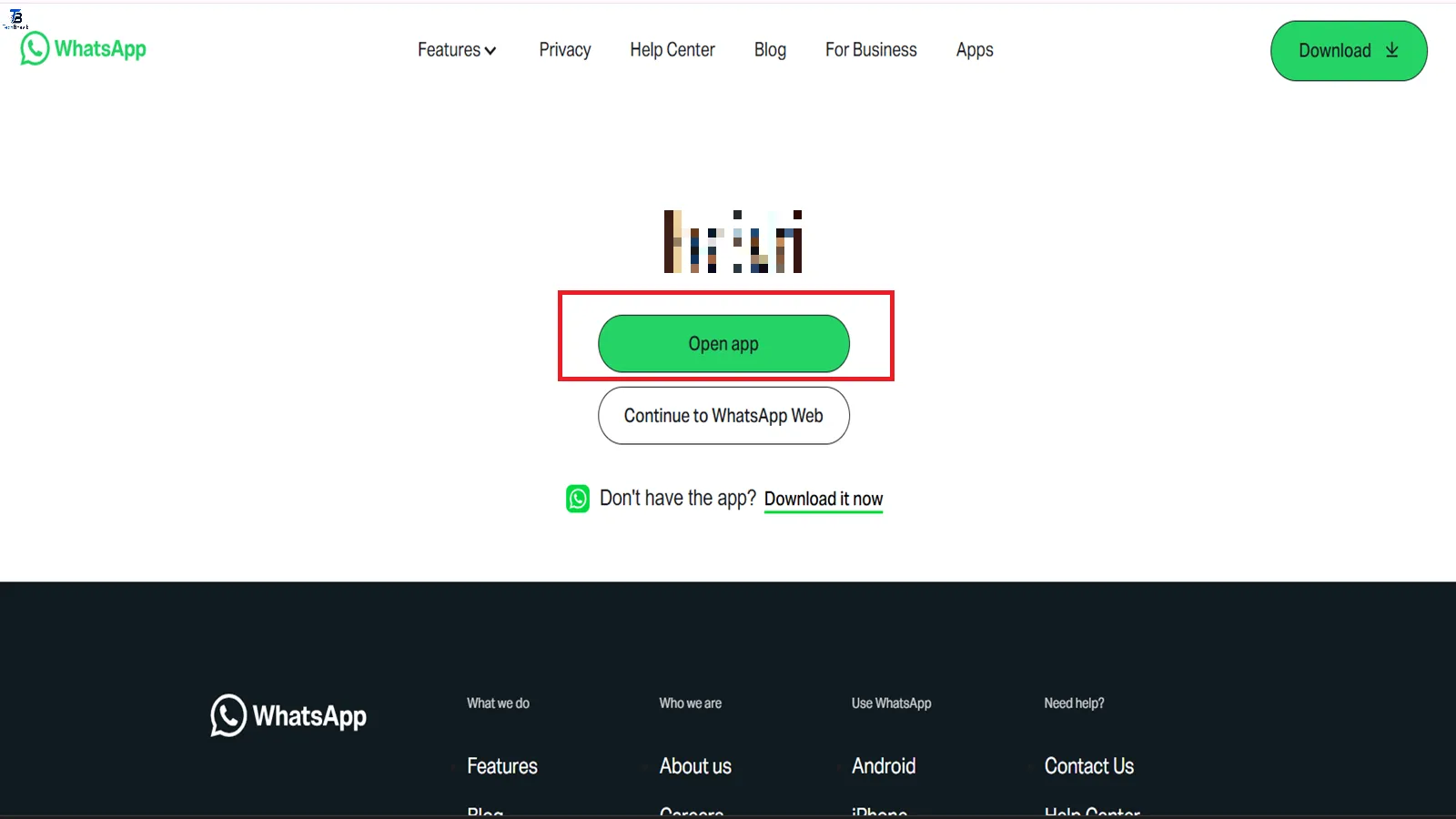
[IMAGE screenshot showing Safari browser with wa.me/91 link entered and the green “Continue to Chat” button on WhatsApp’s landing page]
4. Pin Key Messages So They Never Get Lost
UPI IDs, flat addresses, and meeting links drown in active groups. I missed a courier because the address was 300 messages up. Pinning solved it on my test machine.
How to do it: Long-press any message > tap the Pin icon. Choose 24 hours, 7 days, or 30 days. A banner stays at the top of the chat for everyone. Tap it to jump to the original message. WhatsApp syncs the pin state across all devices via the message metadata flag.
5. Format Text With Bold, Italics, Lists, and Monospace
I send vendor quotations on WhatsApp. Plain text looks unprofessional. Formatting gets me faster replies. These shortcuts have worked since WhatsApp 2.12.5.
Use these:
*text*becomes text for bold_text_becomes text for italics~text~becomes ~text~ for strikethrough`text`becomestextfor monospace code- Start a line with
*or-for bullets. Use1.for numbered lists.
The app parses markdown before the payload is encrypted and sent.
6. Create Your Own “Notes to Self” Chat for Cloud Storage
I haven’t used Google Keep since 2024. My “You” chat is faster. I forward tweets, save voice notes, and move files to my PC with WhatsApp Web.
How I enabled it: Tap New Chat > tap your own contact card at the top. That’s it. It’s end-to-end encrypted like any other chat. I pin it to the top of my list. Because it’s a real chat thread, search and media gallery both work.
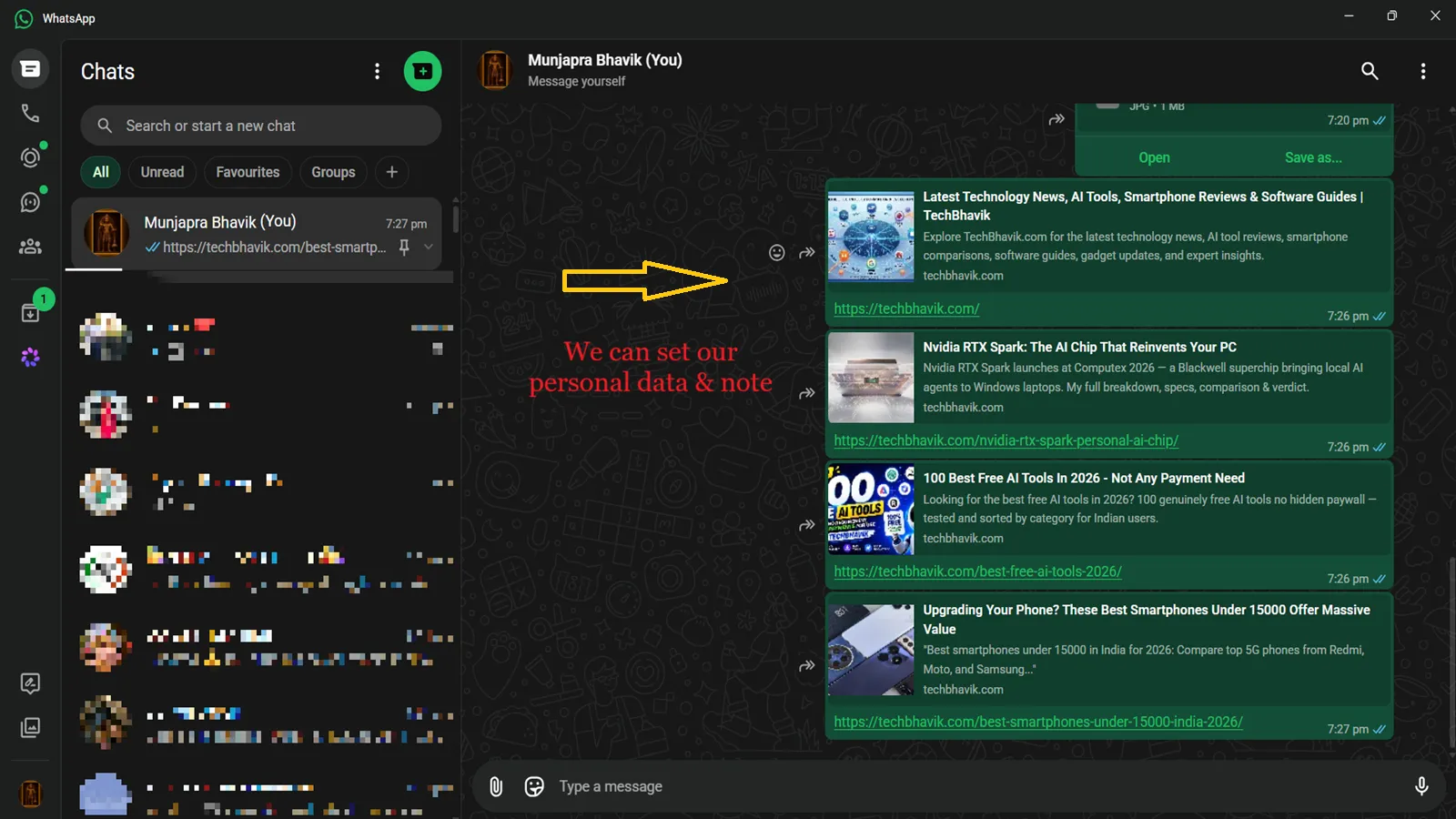
[IMAGE screenshot showing WhatsApp chat list with “You (your name)” at the top, with a pinned icon and a few self-sent links visible]
7. Stop WhatsApp From Eating Your Phone Storage
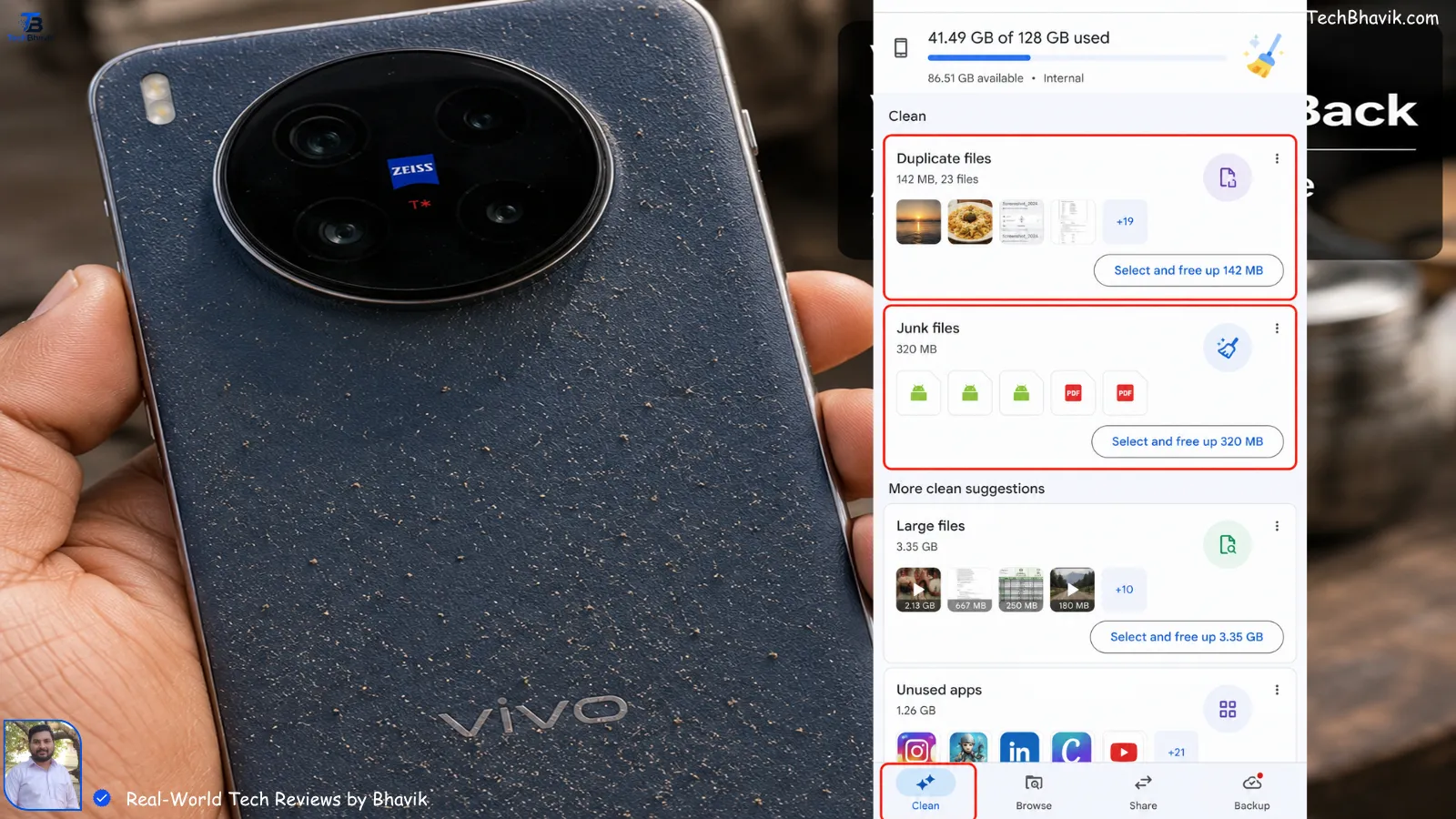
My dad’s phone showed “Storage Full” every 3 weeks. The issue: auto-download on mobile data. I changed 4 settings and reclaimed 11.2GB.
My setup: Settings > Storage and Data > Media Auto-Download. For “When using mobile data” and “When connected on Wi-Fi”, set Photos, Audio, Videos, and Documents to No media. Then go to Settings > Storage and Data > Manage Storage. Delete files larger than 5MB and review forwarded content. Disabling auto-download works because it stops the media download job from running in the background.
Quick Compare: Default vs Tweaked WhatsApp
| Setting | Default Behavior | With These WhatsApp Tips & Tricks | Technical Reason |
|---|---|---|---|
| Media Quality | Photos compressed to ~200KB via lossy JPEG | Original quality via Document route | Bypasses image_transcoder service |
| Chat Privacy | Full message preview in notifications | Content hidden, biometric needed | Chat Lock uses FLAG_SECURE + biometrics |
| Contact Saving | Must add to phonebook to message | Direct chat via wa.me URL | Uses public intent handler, no DB write |
| Storage Control | Auto-downloads all media on Wi-Fi | Zero auto-downloads, manual tap only | Disables background DownloadManager jobs |
Frequently Asked Questions
1. If I send an image as a Document, can the other person still see a preview?
Yes, but it’s small. They see a file icon with the name, not a full gallery thumbnail. Tell them to tap “Download” for the HD version. I always add “HD file” in the caption.
2. Does Chat Lock also lock WhatsApp Web/Desktop?
Yes. Once locked on the phone, the chat is hidden on linked devices too. You unlock it with your phone’s biometrics. I tested this between my Galaxy M35 and the Windows 11 WhatsApp app.
3. Will turning off auto-download delete my old photos?
No. It only affects new incoming media. Your existing gallery stays. To remove old files, use “Manage Storage” and delete them manually.
4. Is the wa.me link safe? Can someone spam me with it?
The link only opens a chat window. They can’t message you unless you reply first. Your number isn’t exposed beyond what you already share. It’s Meta’s own domain, so it’s as safe as WhatsApp itself.
Pick One and Try It Today
Start with Chat Lock or killing auto-download. You’ll notice your phone feels faster in 10 minutes. These WhatsApp tips & tricks aren’t secret. They’re just buried 3 taps deep in settings.
Which trick will you use first? Follow for more tech guides that skip the fluff. Drop a comment below with your own troubleshooting experiences — I test the best ones on my devices and feature them next month.
Check it:
It sounds amazing – Top Best Earphones Under 2000 In India

Bhavik Munjapara
Hello friends, my name is Bhavik Munjpara. I am the founder and sole administrator of techbhavik.com. In this era of huge technology, my main aim is to convey the difficult matters of mobile, computer and technology to all my readers in a very simple, accurate and useful language. Even though I run this site alone and my journey is still new, I will always try to provide fully verified and best information with all my hard work. Thank you for your support and cooperation!Stay connected with my website: If you liked this information, then don't forget to share it with your friends. If you have any tech-related questions, you can ask them in the comment box below or give the necessary information by mentioning the new topic on which you want information.⚠️ Disclaimer: The information provided in this blog post is for educational and informational purposes only. The world of technology is constantly changing, so be sure to check the official guidelines before using any software or hardware.
Follow Me
![Windows 11 vs Windows 12 side by side comparison on desktop monitors in India]](https://techbhavik.com/wp-content/uploads/2026/06/win-12-150x84.webp "7 Hidden WhatsApp Tricks Every Indian Should Know")
















Show CommentsHey Bhavik, this is incredibly useful! The layout of your guide is clean, and skipping the fluff makes it a great read.
I’ve been dealing with the “Storage Full” nightmare on my dad’s phone for months due to family group videos. Setting the Media Auto-Download to “No Media” and cleaning out files over 5MB is easily the most practical tip here—it’s going to save me a ton of tech-support time at home.
The wa.me shortcut is also a lifesaver for dealing with delivery agents without cluttering my contact list. Thanks for the breakdown, especially with the tested versions for Android and iOS. Looking forward to next month’s guide!
Коммерческая деятельность является важным локомотивом роста общества.
Оно открывает свежие рабочие места и обеспечивает населению надёжный заработок.
Более того, бизнес стимулирует нововведения и разработку новых продуктов.
Следовательно, предпринимательство делает среду намного более устойчивой и даёт путь для успеху.
Частный бизнес является значимым фактором роста экономики.
Оно открывает новые рабочие позиции и даёт людям постоянный заработную плату.
Более того, свое дело стимулирует нововведения и разработку современных решений.
В итоге, бизнес делает жизнь намного более динамичной и открывает шанс для личностному росту.
На нашем сайте легко обнаружить множество полезных публикаций.
На страницах ресурса представлены многочисленные руководства на актуальные вопросы.
Любой читатель сумеет почерпнуть немало полезного и расширить свой понимание.
Публикации постоянно пополняются, дабы читатели всегда имели доступ к самой актуальной базе.
На данном ресурсе удастся отыскать массу познавательных данных.
Здесь представлены различные тексты на важные вопросы.
Всякий пользователь имеет возможность почерпнуть что-то нового и пополнить собственный кругозор.
Материалы периодически пополняются, чтобы пользователи неизменно располагали возможность к самой новейшей базе.
На этом портале вы сможете почерпнуть огромное количество увлекательных данных.
На этой платформе опубликованы различные руководства на актуальные темы.
Всякий гость сумеет открыть для себя много нового и расширить свой кругозор.
Статьи постоянно обновляются, чтобы пользователи неизменно располагали возможность к самой новейшей информации.