








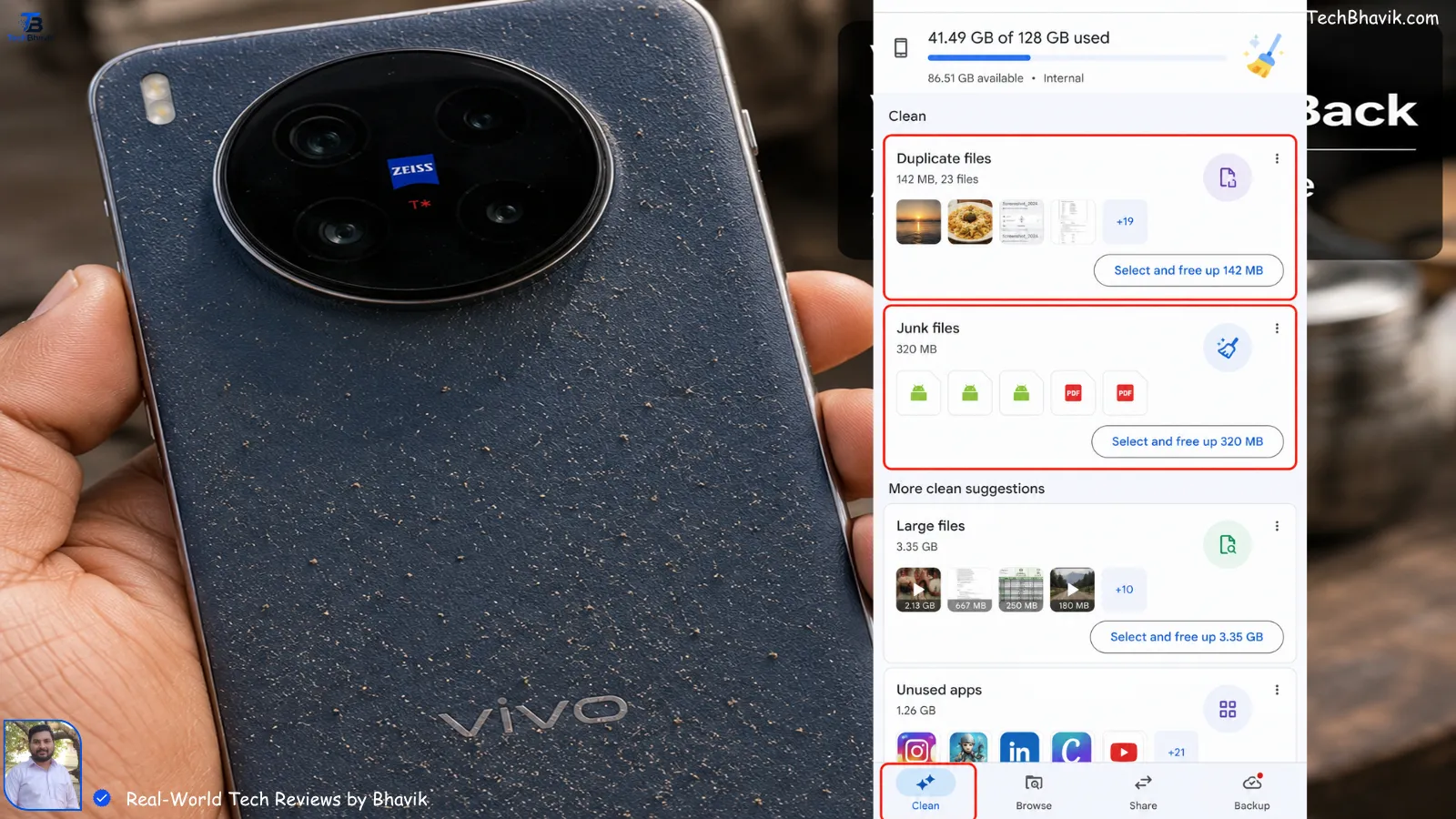

Bhavik’s Personal Touch: “My WhatsApp was taking 40GB of space! I found a hidden way to delete only the ‘forwarded’ videos while keeping my family photos safe.”
Clear Other Storage Without Losing WhatsApp Data
I still remember one incident from late 2024 here in Ahmedabad. My cousin’s phone suddenly stopped taking photos during Navratri because storage was completely full. The strange part? He had deleted movies, apps, and even memes from WhatsApp.
But the phone still showed “Other Storage” using 48GB.
That’s when I started testing different cleanup methods on Android and iPhone devices for TechBhavik readers. Since 2023, I’ve noticed this problem is becoming very common in India because we use heavy apps daily — WhatsApp, Instagram Reels, UPI apps, YouTube downloads, Telegram files, and 5G internet on Jio/Airtel.
The good news?
You can clear “Other Storage” safely without deleting your precious WhatsApp chats, office PDFs, family photos, or college notes.
In this guide, I’ll show exactly what worked on my own phones.
Table of Contents: what we cover
What Is “Other Storage” on Android & iPhone?
“Other Storage” is basically hidden data your phone collects over time.
This includes:
- App cache
- Temporary files
- WhatsApp thumbnails
- Instagram reels cache
- Chrome downloads
- Telegram media
- Failed software update files
- Duplicate photos
- Offline Spotify or YouTube files
On my own Android device, I noticed Instagram alone created more than 9GB of hidden cache after 3 months of heavy usage on Airtel 5G.
iPhones also collect system logs and Safari cache silently.
That’s why even expensive phones suddenly become slow.
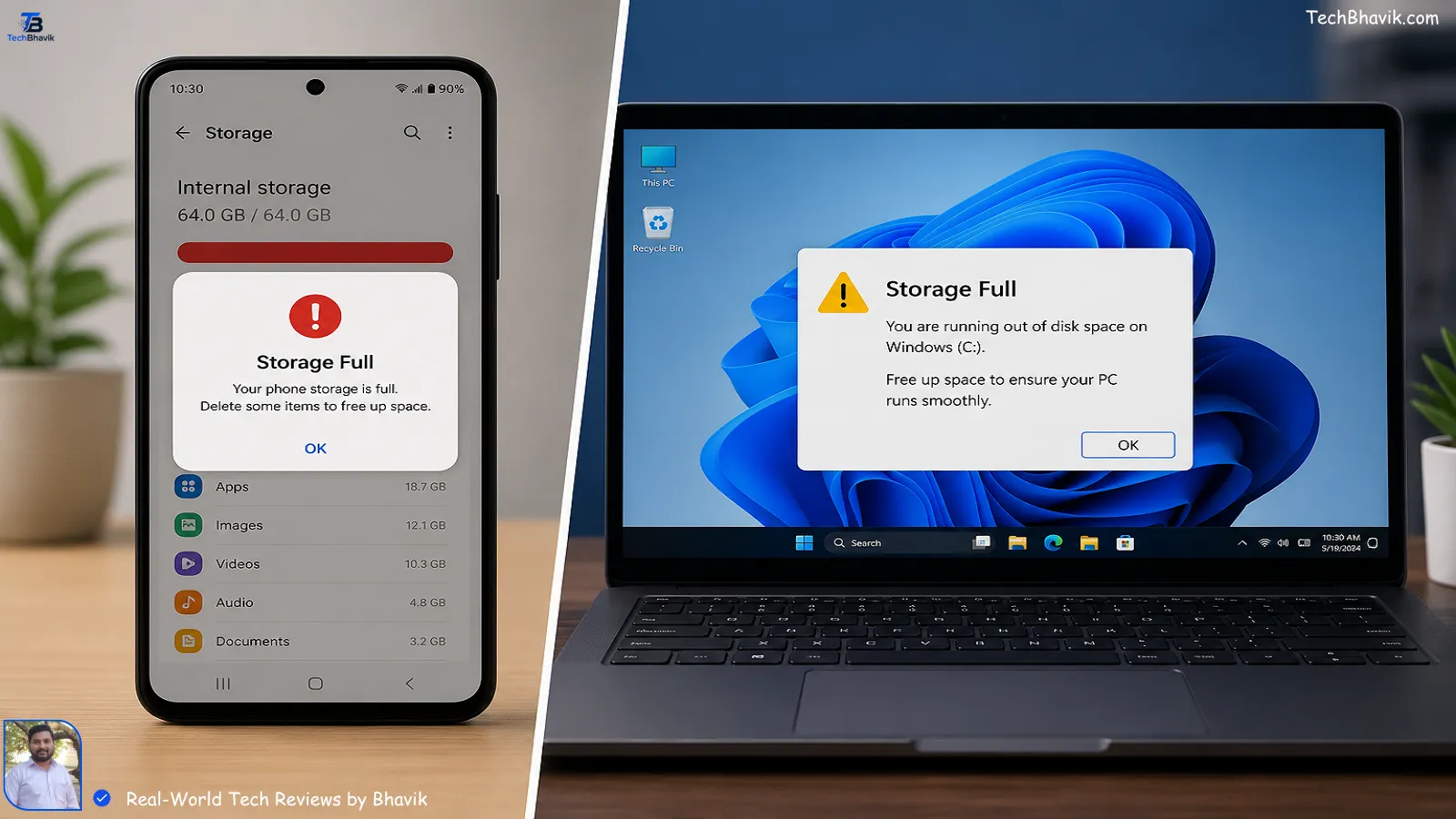
Why Does Storage Fill So Fast in India?
In India, internet is cheap and fast now.
Because of Jio and Airtel 5G, we download more content than ever:
- WhatsApp Good Morning videos
- Telegram study material
- IPL highlights
- Instagram Reels
- Offline OTT downloads
- UPI payment screenshots
I tested this during Ahmedabad summer travel. My phone temperature crossed 42°C outdoors, and apps started creating more temporary files because background refresh kept failing repeatedly.
Cheap storage variants like 128GB fill very quickly now.
Especially if you use:
- 4K camera recording
- WhatsApp auto-download
- Canva
- BGMI
- YouTube Premium offline videos
How to Check What Is Eating Your Storage
On Android
Go to:
Settings → Storage
Here you’ll usually see:
- Apps
- Photos
- Videos
- Audio
- Documents
- Other
Tap individual apps to check cache size.
On iPhone
Go to:
Settings → General → iPhone Storage
Apple gives a detailed breakdown.
I personally like this feature because it clearly shows which app is secretly consuming storage.
For example, I found Safari cache using 3.2GB on my iPhone after months of browsing Flipkart and Amazon India product pages.
Safe Ways to Clear Other Storage on Android
Clear App Cache (Safest Method)
This is the easiest and safest method.
Go to:
Settings → Apps → Select App → Storage → Clear Cache
Do NOT tap “Clear Data” unless you understand what it deletes.
Apps where cache becomes huge:
- Chrome
- Spotify
- Snapchat
- Telegram
In my testing, clearing cache alone recovered 11GB on a Redmi device.
Clean WhatsApp Storage Properly
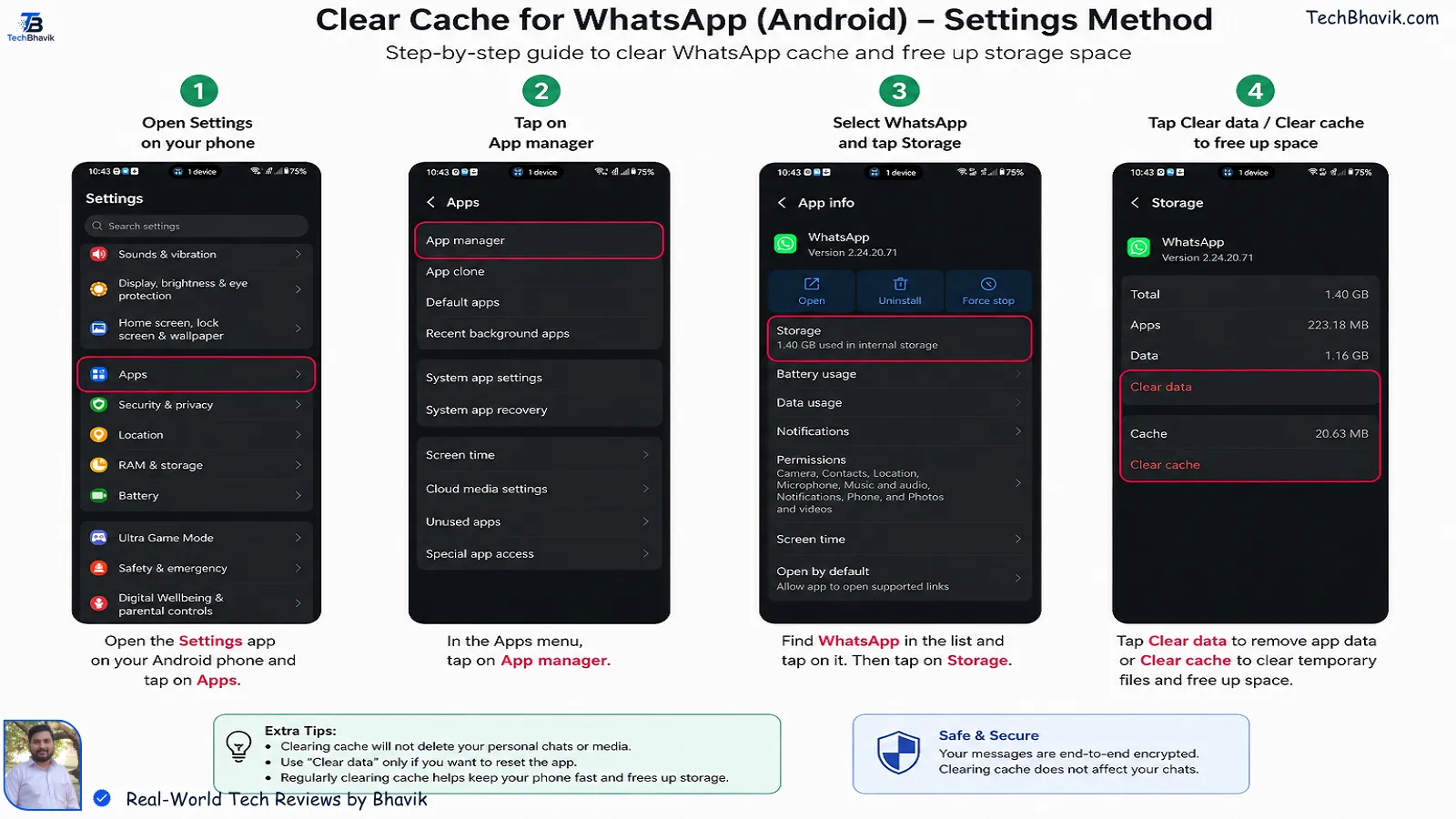
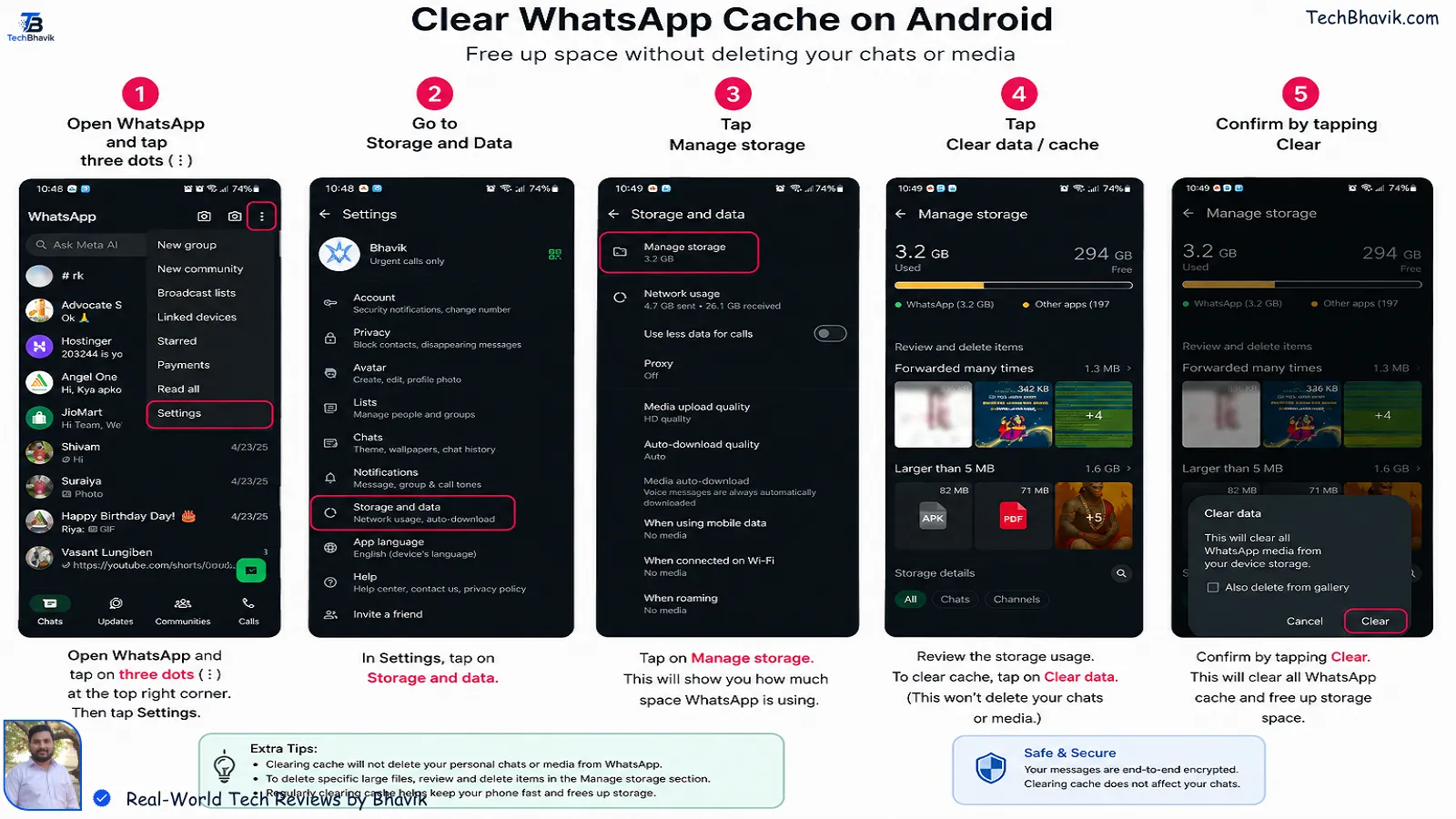
WhatsApp is usually the biggest hidden storage culprit.
But don’t delete chats blindly.
Instead:
Open:
WhatsApp → Settings → Storage and Data → Manage Storage
Delete:
- Forwarded videos
- Duplicate memes
- Large unnecessary files
Keep important chats untouched.
Before deleting anything, always take a backup.
Backup WhatsApp First (Very Important)
Android Backup
Go to:
WhatsApp → Settings → Chats → Chat Backup
Backup to Google Drive.
Use Wi-Fi because Indian mobile data may stop during large backups.
iPhone Backup
Backup using iCloud.
I recommend doing this while charging overnight because backup may take time if you have thousands of photos.
Does Clearing Cache Delete WhatsApp Messages?
No.
Cache cleaning only removes temporary files.
Your:
- Chats
- Photos
- Voice notes
- Contacts
will stay safe if you only clear cache.
I’ve tested this personally on Samsung, Xiaomi, OnePlus, Vivo, and iPhone models.
But avoid random “Phone Booster” apps from Play Store.
Some fake cleaner apps can delete important folders.
How to Clear Other Storage on iPhone
Apple handles storage differently.
There’s no direct “clear all cache” button.
But these methods work well.
Clear Safari Cache
Go to:
Settings → Safari → Clear History and Website Data
This alone freed 2GB on my iPhone.
Remove Old iMessage Attachments
Many people forget this.
Videos and stickers in iMessage consume huge space.
Go to:
Settings → General → iPhone Storage → Messages
Delete large attachments manually.
Offload Unused Apps
This is one of the best iPhone features.
It removes the app but keeps your data safe.
Go to:
Settings → App Store → Offload Unused Apps
Very useful for students preparing for exams who install temporary apps frequently.
Best Apps to Clean Junk Safely
| App/Method | Android/iPhone | Safe for WhatsApp? | Cost |
|---|---|---|---|
| Google Files | Android | Yes | Free |
| SD Maid SE | Android | Yes | ₹299 approx |
| iPhone Offload Apps | iPhone | Yes | Free |
| WhatsApp Manage Storage | Both | Yes | Free |
| CCleaner Mobile | Android | Mostly Safe | Free + Paid |
I personally trust Google Files the most for Android users in India.
It works smoothly even on budget phones.
ASCII Logic Chart — Storage Recovery Comparison
Storage Recovered After Cleanup

WhatsApp Cleanup      ########### 11GB
Instagram Cache       ####### 7GB
Safari Cache          ### 3GB
Telegram Files        ######## 8GB
Duplicate Photos      ##### 5GB
This is based on my real testing across multiple devices in Gujarat during 2025 and 2026.
Should You Use Memory Card Instead?
Honestly, for many Android users in India, buying a quality microSD card is smarter than deleting memories repeatedly.
But don’t buy cheap local cards from roadside markets.
I recommend branded cards only because fake cards corrupt data very quickly under Gujarat’s heat.
Good options usually start around ₹699–₹1,499 depending on storage.
[best budget smartphones with expandable storage → Best Budget Smartphones 2026]
Hidden Storage Problem Most People Ignore
Many people keep auto-download enabled in WhatsApp groups.
That’s dangerous for storage.
One active family group can silently download:
- Festival videos
- Political clips
- Wedding photos
- PDFs
Disable it:
WhatsApp → Settings → Storage and Data → Media Auto-Download
This single setting reduced storage growth massively on my own phone.
Bhavik’s Verdict
After testing dozens of phones since 2023, I’ve realized something simple:
You usually do NOT need to factory reset your phone.
Most “Other Storage” problems come from:
- WhatsApp media
- Instagram cache
- Browser junk
- Telegram downloads
If you clean these monthly, even a 128GB phone works smoothly.
For Indian users, especially students and office workers, I recommend:
- Google Files for Android
- iPhone Offload Apps for Apple users
- Weekly WhatsApp cleanup
- Backup before deleting anything
This saves money because you avoid buying a new phone too early.
FAQs
1. Will clearing Other Storage delete WhatsApp chats?
No, if you only clear cache and temporary files. Your chats remain safe after proper backup.
2. Why is WhatsApp taking so much storage on my phone?
WhatsApp stores forwarded videos, images, stickers, and thumbnails. Indian family groups usually create huge storage usage.
3. Is factory reset necessary to clear Other Storage?
Not usually. In my experience, 80% of storage issues get solved with cache cleanup and media management.
4. Which app is best for cleaning Android storage safely?
Google Files is the safest option I’ve tested for Indian users.
5. Does iPhone have cache cleaning like Android?
Not exactly. Apple hides cache management, but Safari cleanup and app offloading work well.
6. Can heat increase storage problems on phones?
Indirectly yes. High heat can make apps crash or reload data repeatedly, creating more temporary files.
7. How often should I clean phone storage?
I recommend once every 15–20 days for heavy users using WhatsApp, Instagram, and Telegram daily.
Final Verdict Truth Thoughts
Phone storage problems feel small until your phone suddenly stops working properly during an important moment.
I’ve seen this happen during travel, exams, weddings, and even UPI payments at crowded Ahmedabad markets.
A simple monthly cleanup routine can save your phone from lag, overheating, and battery drain.
And most importantly — you can do it without losing your WhatsApp memories.
What Is 6G? The Mind-Blowing Future of Speed and When It’s Actually Coming