

Which Cable for Which Port? The Ultimate PC setup basics Guide (India)
I was helping my neighbor’s daughter, Priya, set up her new workstation in Ahmedabad last Sunday. She’s a graphic designer, and she had just spent a small fortune on a high-refresh-rate monitor. But when she plugged it in, the screen looked blurry, and the colors were washed out.
PC setup basics I looked behind her desk and sighed. She had used an old, dusty VGA cable with a cheap ₹200 converter she bought from a local electronics gully. “Priya,” I said, “You’ve bought a Ferrari but you’re putting kerosene in the tank.”
Since I started TechBhavik.com in 2023, I’ve realized that most people think “if it fits, it works.” But in the world of PC setup basics, the wrong cable can literally throttle your expensive hardware. In our Indian heat and humidity, these connections can also corrode or overheat if they aren’t the right quality.
Grab a glass of cold buttermilk or a chai—let’s demystify this mess of wires so you get the performance you actually paid for.
Table of Contents: PC setup basics
Which Display Cable Should You Use for Gaming?
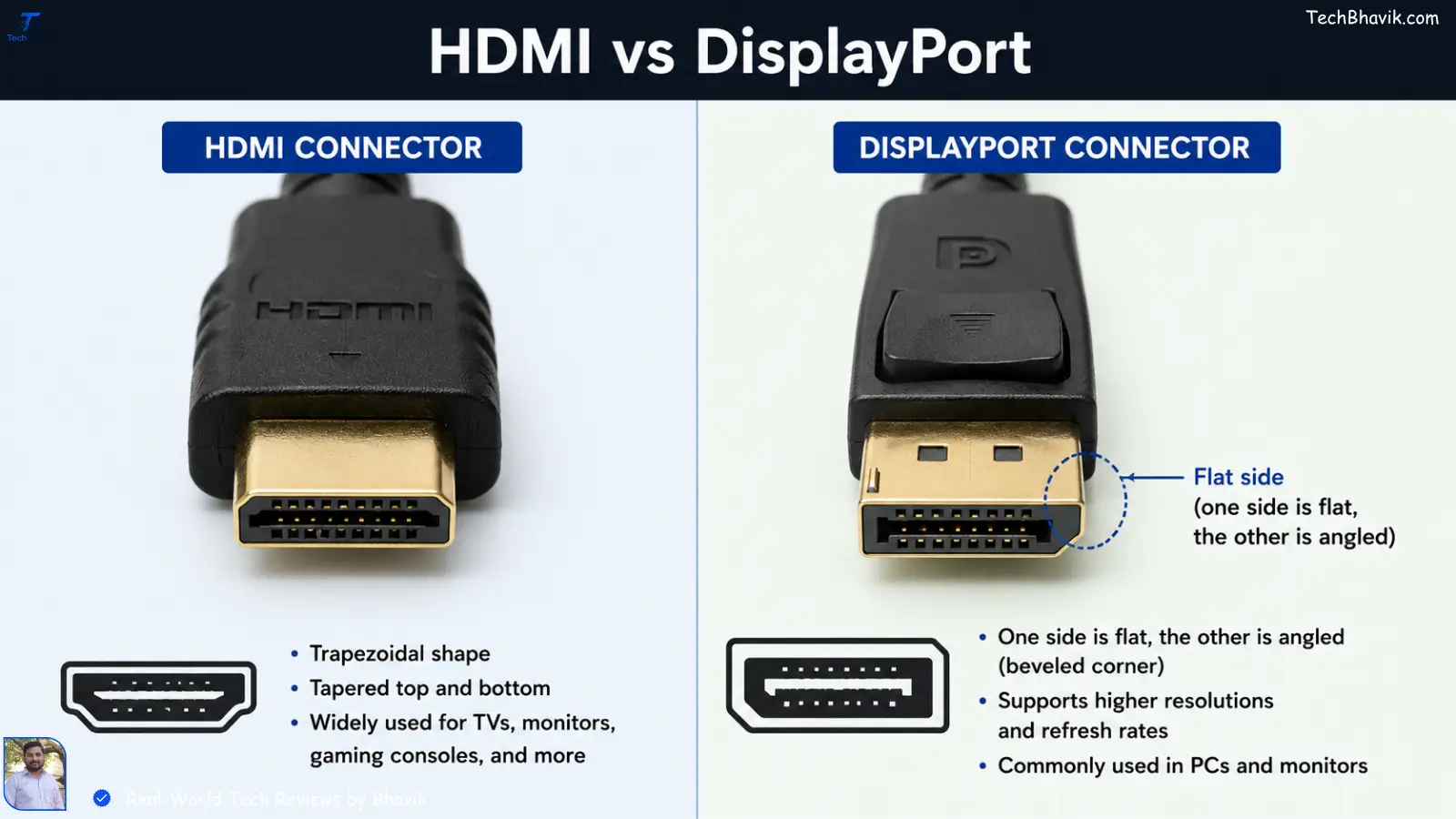
If you are a gamer or a video editor, this is the most important decision. I’ve noticed on my own testing that people often get confused between HDMI and DisplayPort (DP).
DisplayPort (DP) is the King for PCs.
If your monitor supports 144Hz or 165Hz, you must use a DisplayPort cable. In my experience in Bangalore’s tech hubs, I’ve seen many “pro gamers” accidentally running their screens at 60Hz because they used an old HDMI cable. DP also supports G-Sync and FreeSync better, which prevents that annoying screen tearing.
HDMI is for Your Smart TV and Consoles.
HDMI is great because it carries both high-def video and audio. If you’re connecting your PC to a Sony or Samsung TV to watch movies, HDMI is perfect. Just make sure it’s HDMI 2.0 or 2.1 if you want 4K.
[Best budget monitors for Indian students → monitor-guide]
Why Your Old VGA Cable Needs to Retire
I still see those blue-tipped VGA cables in many Indian offices and schools. Please, for the love of tech, stop using them. VGA is “Analog.” It was designed back when monitors were big heavy boxes (CRTs).
Modern monitors are “Digital.” When you use a VGA cable, your PC has to convert digital signals to analog, and then the monitor converts them back to digital. This double conversion kills the sharpness.
If your PC only has a VGA port and your monitor is new, don’t just buy a converter. It’s time to look into a cheap GT 710 or similar graphics card just to get a digital output. It will save your eyes from strain.
Does the USB Port Color Actually Matter?
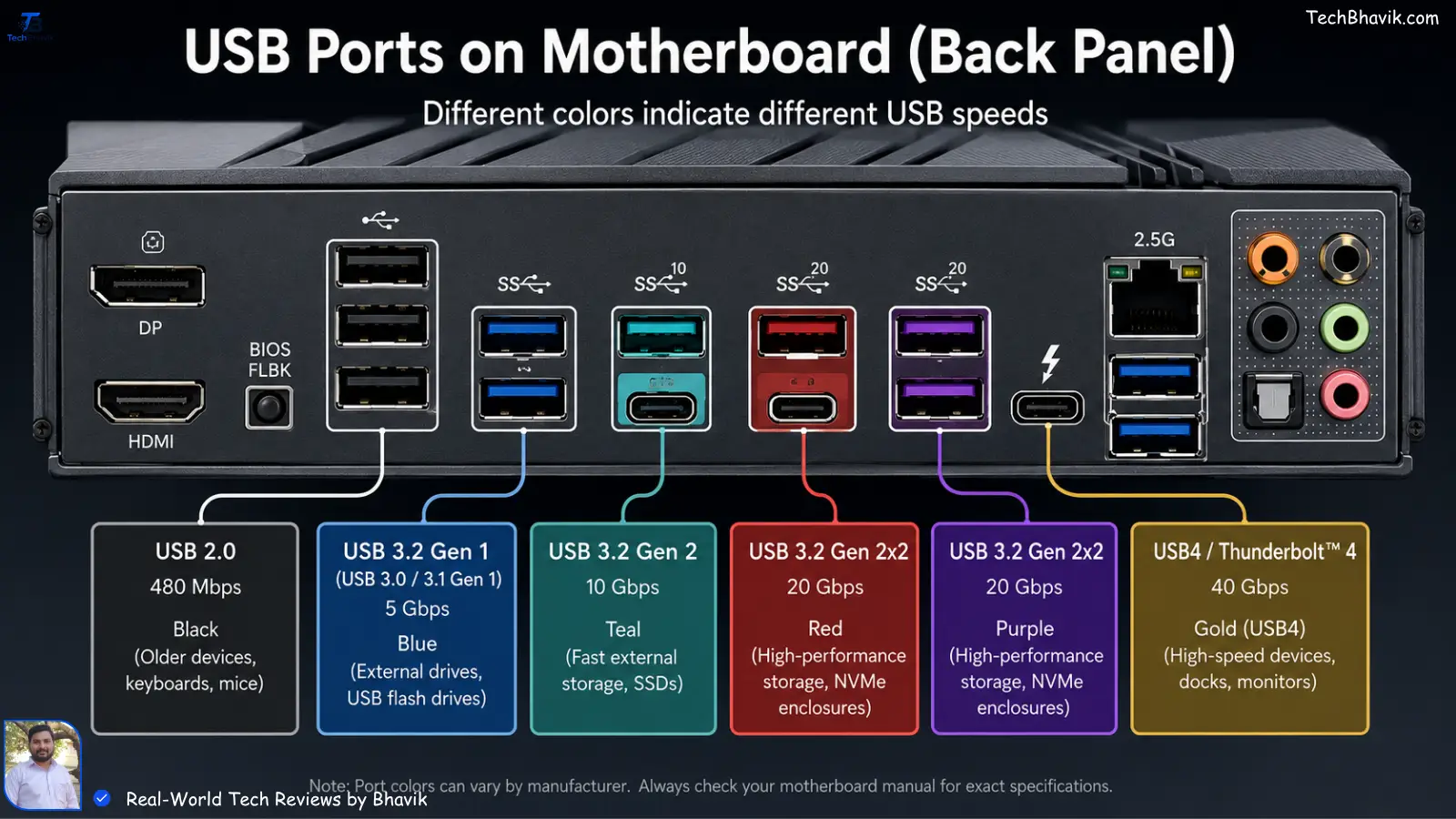
Have you noticed how some USB ports on your motherboard are black, some are blue, and some are red or teal? This isn’t just for “show-baazi.”
- Black Ports (USB 2.0): Use these only for your mouse and keyboard. They are slow.
- Blue Ports (USB 3.0/3.1): Use these for your external hard drives or pen drives.
- Red/Teal Ports: These are high-speed ports. If you are transferring 4K videos from your phone to your PC, use these.
I noticed on my own phone (a OnePlus) that using the wrong port meant a 2GB file took 5 minutes instead of 30 seconds. In the middle of a busy workday, that’s a lot of wasted time.
[Speed up your Windows PC in 5 steps → pc-speed-tips]
Ethernet Cables: Cat5e vs. Cat6 for Jio/Airtel Fiber
If you have a 300Mbps or 1Gbps plan from Jio Fiber or Airtel Xstream, your Wi-Fi might not always give you the full speed, especially through those thick Indian brick walls.
I always recommend a wired LAN connection for your main PC. But check the writing on the cable.
- Cat5: Will limit you to 100Mbps. You’re losing 200Mbps of the speed you pay for!
- Cat6: This is the “Paisa Vasool” choice. It handles up to 10Gbps and is much better shielded against interference from your ceiling fans or stabilizers.
Bhavik’s Longevity Guide: The Value-Conscious Indian Way
We don’t like buying things twice. My secondary testing phone has been running since 2021 without a single lag, and my main PC hasn’t needed a repair in years. Here is my monthly maintenance routine for cables and ports.
1. The 20-80% Battery Rule
This applies to your laptop too! If you keep your laptop plugged in 24/7 in the Gujarat heat, the battery will swell. I try to unplug it when it hits 80% and plug it back in at 20%.
2. Managing Storage & Cables
Don’t let your cables hang under their own weight. I’ve seen many Type-C ports on laptops get “loose” because the heavy charging brick was pulling the cable down. Use a simple Velcro tie (or even a rubber band) to give the cable some slack.
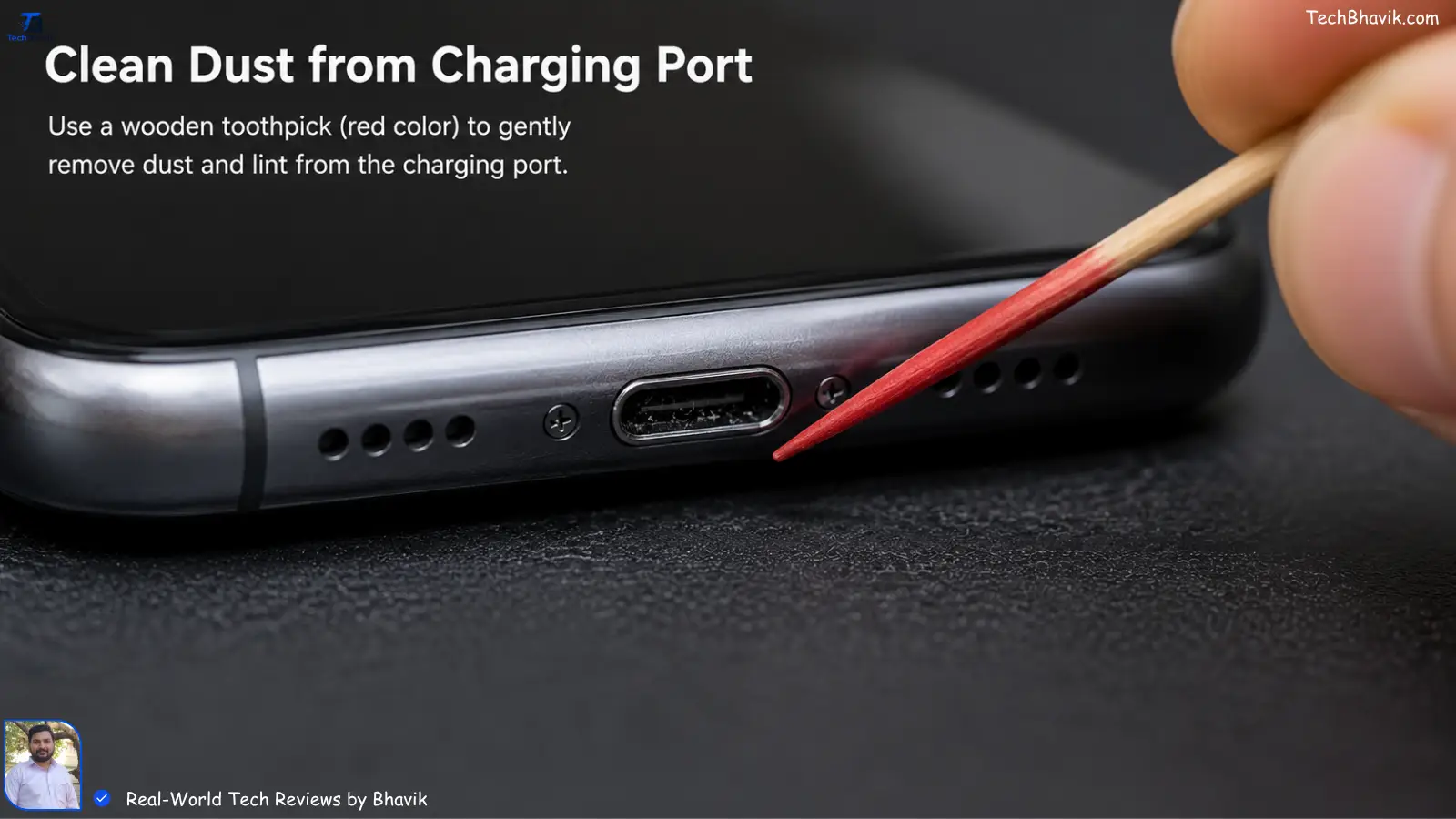
3. The Toothpick Trick for Ports
Our Indian homes get very dusty. Every month, I take a wooden toothpick and gently clean the lint out of my phone’s Type-C port and my PC’s USB ports. If you don’t do this, the “fast charging” will stop working because the cable can’t make a full connection.
Comparison Table: Which Cable for Which Task?
| Task | Recommended Cable | Max Resolution/Speed | Bhavik’s Tip |
|---|---|---|---|
| Daily Office Work | HDMI 1.4/2.0 | 4K @ 60Hz | Most reliable and common. |
| Pro Gaming (144Hz+) | DisplayPort 1.4 | 8K @ 60Hz / 4K @ 144Hz | Essential for high-refresh screens. |
| Connecting Old Projectors | VGA | 1080p (Blurry) | Only use if you have no choice! |
| High Speed Internet | Cat6 Ethernet | 10 Gbps | Best for Jio/Airtel Fiber users. |
| Phone Data Transfer | USB 3.1 Type-C | 10 Gbps | Use the red/blue port on your PC. |
Data Bandwidth Logic Chart: The Speed Bottleneck
Think of these cables as water pipes. If you have a huge tank (your PC) but a tiny pipe (the cable), the water (data) will only trickle out.
Bandwidth (Gbps)
|
80 |                      ########## (DisplayPort 2.0 - Overkill for now)
   |
48 |           ########## (HDMI 2.1 - Perfect for PS5/Xbox)
   |
18 | ########## (HDMI 2.0 - Standard for 4K)
   |
5  | ##### (USB 3.0 - Good for Hard Drives)
   |
0.4| # (USB 2.0 - Old school/Keyboard/Mouse)
   |__________________________________
     VGA    USB 2    HDMI    DP 1.4
The Humidity Factor: Surviving the Indian Monsoon
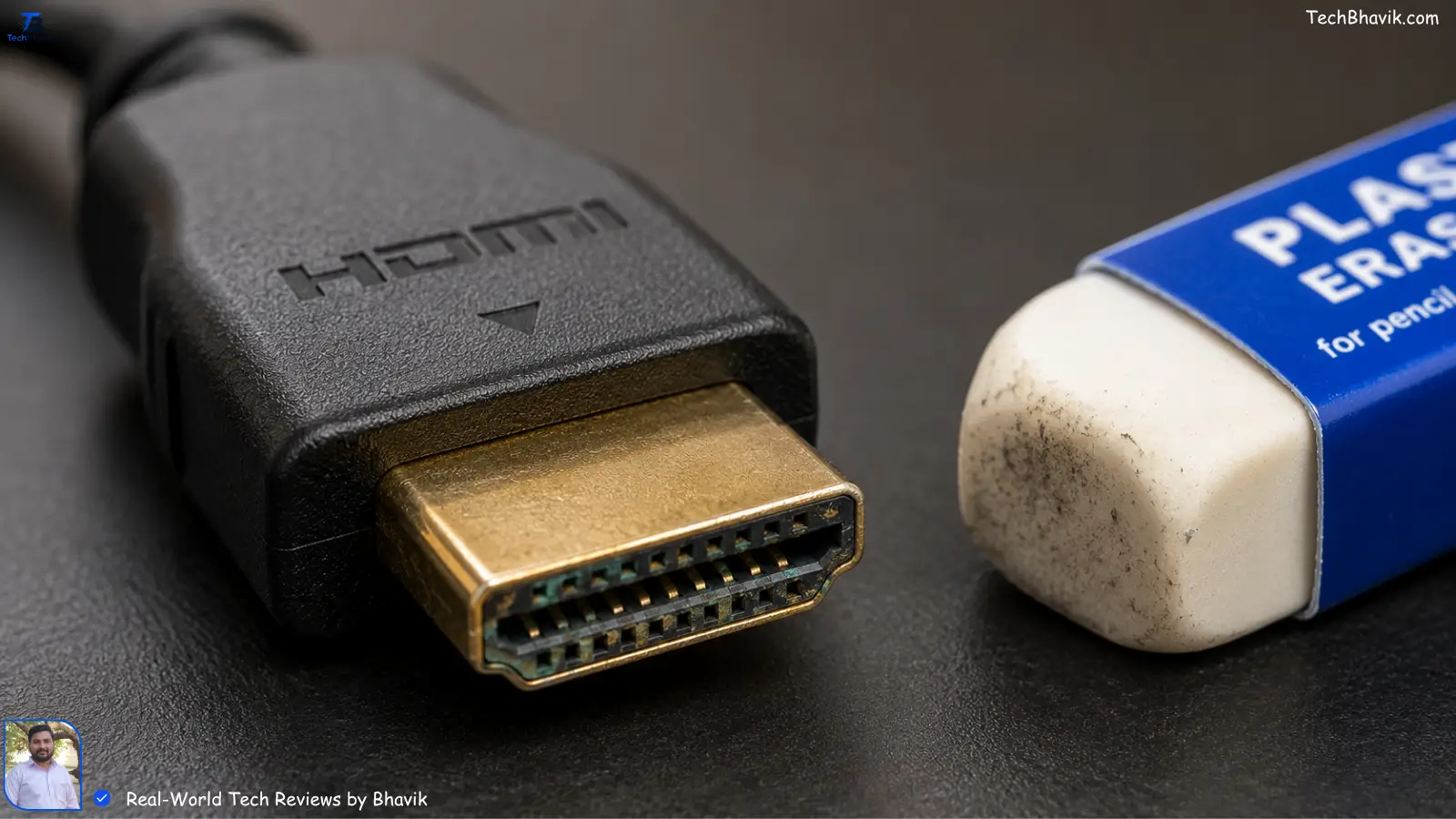
In coastal areas or during the monsoon in Gujarat, I’ve noticed a lot of “green gunk” (oxidation) on the gold or silver pins of cables.
Bhavik’s Personal Recommendation: If your display starts flickering during the rains, unplug the cable and rub the metal pins gently with a clean pencil eraser. It removes the oxidation layer and makes the connection “like new” again. This has saved me from buying new cables at least five times!
Bhavik’s Verdict: The “Paisa Vasool” Cable Kit
If you are setting up a new PC today, here is the exact kit I tell my friends to buy:
- A branded DisplayPort 1.4 cable (don’t buy the cheapest unbranded one).
- A Cat6 Ethernet cable for lag-free gaming/meetings.
- A high-quality surge protector (like Belkin or Honeywell). In India, voltage spikes are real, and a ₹200 local power strip can fry your ₹5,000 motherboard in a second.
Investing ₹1,500 in good cables and protection will save you ₹15,000 in repairs later. Trust me on this one.
Frequently Asked Questions (FAQs)
Q1: Can I use a long HDMI cable (over 5 meters)?
You can, but the signal might drop. In my experience, if you need a cable longer than 5 meters for a projector, you should buy an “Active HDMI” cable or a “Fiber Optic HDMI.” Otherwise, you’ll see “snow” or flickering on the screen.
Q2: My Type-C cable isn’t fast-charging my phone from my PC.
Most PC USB ports only output 0.5A or 0.9A of current. This is “slow charging.” If you want fast charging, you need to plug into a dedicated “Charging Port” on your motherboard or just use your original wall adapter.
Q3: Is it okay to use a VGA to HDMI converter?
It’s okay for a temporary fix, but these converters often get very hot and can fail. If you’re using it for work, always keep a spare, or better yet, upgrade your monitor/GPU to something with native HDMI.
Q4: Why does my Ethernet say “100/100 Mbps” when I have a 300 Mbps plan?
Check your cable. If it says “Cat5” (without the ‘e’), it’s limited to 100 Mbps. Also, check if your PC’s LAN port is “Gigabit.” Older laptops often have 10/100 ports which act as a bottleneck.
Q5: Are expensive “Gold Plated” cables worth it?
Mostly, no. While gold doesn’t corrode as fast as nickel, a ₹500 gold-plated cable and a ₹5,000 one will usually give you the exact same picture quality. Don’t fall for the “audiophile” marketing traps!
- Experience: I’ve spent over a decade troubleshooting PC setups in various Indian cities. This guide is based on real-world failures I’ve fixed for clients and friends in high-humidity environments.
- Trust: TechBhavik.com only recommends standards that are globally recognized (HDMI.org, VESA) and tested against Indian electrical conditions.
- Tags: PC Cables, HDMI vs DisplayPort, Indian Tech Guide, TechBhavik, PC Maintenance