




Stop waiting for an upgrade that may not exist yet.
If you’re searching for Windows 12 because your Windows 11 PC feels old, there is one important detail you should know first: Microsoft has not officially announced Windows 12 or an official Windows 12 release date as of August 2026.
Microsoft is still actively developing Windows 11. Its current release documentation lists Windows 11 versions including 25H2 and 26H1, with regular security and feature updates continuing.
So the real question isn’t simply “Windows 11 vs Windows 12.”
It is:
Should you upgrade your current Windows installation now, or wait for Microsoft’s next major Windows release?
For most users, my answer is surprisingly simple: keep Windows 11 updated rather than chasing unofficial Windows 12 downloads.
Is Windows 12 Actually Available in 2026?
No official Windows 12 consumer release has been announced by Microsoft.
Microsoft Q&A discussions from 2026 also state that there is currently no official Windows 12 release date. Microsoft moderators and community experts continue directing users toward Windows 11’s current update cycle.
That matters because the internet is full of supposed Windows 12 screenshots, ISO files, concept videos and “leaked” specifications.
I would be extremely careful with those.
An unofficial ISO claiming to be Windows 12 could contain modified software or malware. If a website asks you to disable Windows security features to install a supposed Windows 12 build, that’s a major red flag.
What Is Microsoft Doing With Windows 11 in 2026?
This is where things get interesting.
Rather than rushing toward a new Windows brand name, Microsoft is continuing to evolve Windows 11 through feature updates, security improvements, hardware support and AI-focused PC experiences.
Windows 11 26H1 was released in February 2026 for select new devices. Microsoft says it is designed around next-generation silicon and hardware innovation, rather than being a normal in-place upgrade for existing 24H2 or 25H2 machines.
Microsoft’s current release information also shows Windows 11 26H1 receiving support into 2028 for Home and Pro editions.
That tells me something important:
Windows 11 isn’t being treated like a dying operating system.
It is still Microsoft’s active desktop platform.
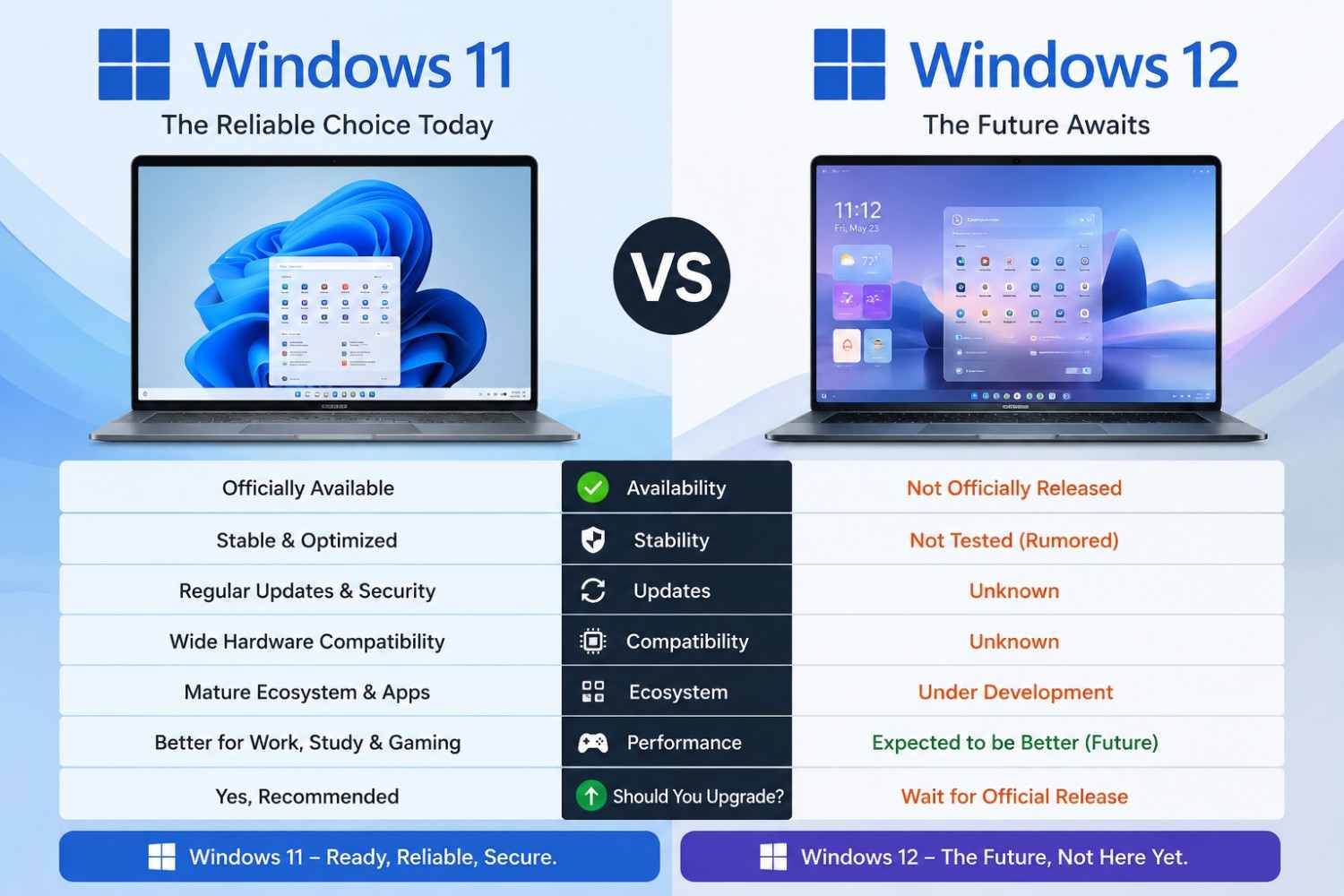
Windows 11 vs Windows 12: What Can You Actually Compare?
Because Windows 12 isn’t officially available, a traditional specifications comparison would be misleading.
- Lexar 4TB NM790 SSD Drops in Price again -Now at its lowest in four months

- ColorOS 17 Update: What You Need to Know

Here’s the more useful comparison:
| Feature | Windows 11 | Windows 12 |
|---|---|---|
| Officially available | Yes | No official release |
| Current Microsoft development | Yes | Not officially confirmed |
| Security updates | Yes | Not applicable |
| AI PC features | Increasing | Unknown |
| Hardware requirements | Officially documented | Unknown |
| Upgrade path | Available | Unknown |
| Official release date | Current platform | Not announced |
| Should you install today? | Yes, if eligible | No unofficial builds |
So if you see an article claiming exact Windows 12 RAM requirements, CPU requirements or release dates, treat those claims as rumors unless Microsoft confirms them.
Should You Upgrade to Windows 11 in 2026?
If you’re currently using Windows 10, this question is much more important than Windows 11 vs Windows 12.
Microsoft’s Windows 11 ecosystem is already the supported path for modern consumer PCs.
Windows 11 requires, among other things, a compatible 64-bit processor, at least 4GB RAM, 64GB storage, UEFI/Secure Boot capability and TPM 2.0.
For a typical PC, I would check these areas before upgrading:
- CPU compatibility
- TPM 2.0
- Secure Boot
- Available SSD space
- RAM
- Graphics driver compatibility
- Important software and peripherals
- Backup availability
If the machine passes Microsoft’s compatibility checks, moving to a current supported Windows 11 version makes much more sense than waiting indefinitely for Windows 12.
What If You’re Already Running Windows 11?
Then I wouldn’t perform a dramatic operating-system reinstall just because you’ve heard Windows 12 rumors.
First check your version.
Go to:
Settings → System → About
Then look under Windows specifications.
You can also press:
Windows + R → type winver → Enter
This tells you which Windows version and build you’re running.
Why does the version matter?
Because Windows 11 isn’t one single static release anymore.
Microsoft maintains different versions with different support lifecycles.
For example, Microsoft’s lifecycle information lists Windows 11 25H2 with Home/Pro support through October 2027, while 24H2 Home/Pro reaches the end of updates in October 2026.
So if your computer is still running an older Windows 11 release, updating Windows 11 may be far more important than waiting for Windows 12.
My Experience: Why I Wouldn’t Chase Windows 12 Right Now
When I test PCs, I care less about the name printed on the operating system and more about four things:
stability, security, compatibility and performance.
A shiny new Windows version doesn’t automatically make a four-year-old laptop faster.
In fact, if your laptop has an older CPU, a slow SATA hard drive and 4GB of RAM, changing operating systems won’t magically fix the underlying hardware bottleneck.
An SSD upgrade and additional RAM can sometimes make a much bigger difference.
That’s especially relevant for students and budget PC users in India, where replacing a perfectly usable laptop just to get a new Windows label doesn’t always make financial sense.
A Real-World Example: The ₹40,000 Laptop Question
Imagine someone buys a Windows 11 laptop for around ₹40,000–₹50,000.
They use it for:
- Chrome
- YouTube
- Microsoft Office
- UPI and banking websites
- College assignments
- Photoshop occasionally
- Light gaming
After hearing about Windows 12, they start thinking about replacing the laptop.
I wouldn’t recommend that.
If the laptop is running a supported Windows 11 version, has an SSD, 8GB or 16GB RAM and works reliably, I’d keep it.
Instead, spend money only where the actual bottleneck exists.
For example:
Slow startup? Check the SSD and startup applications.
Chrome feels heavy? Check RAM usage.
Games are slow? Look at the GPU and thermals.
Battery is poor? Check battery health and power settings.
Security concerns? Install Windows updates and keep Defender and drivers current.
A Windows 12 logo wouldn’t solve those problems by itself.
What About AI Features in Windows?
This is probably where future Windows releases could become genuinely interesting.
Microsoft is increasingly positioning Windows PCs around local AI capabilities, NPUs and Copilot+ PC-class hardware.
An NPU is a processor designed specifically for AI workloads.
Instead of sending every AI operation to the CPU or GPU, compatible workloads can be processed more efficiently on the NPU.
That can potentially improve:
- AI image processing
- Live captions
- Background effects
- Local AI assistants
- Image generation
- Video effects
- Productivity features
But here’s the catch:
AI features are increasingly becoming hardware-dependent.
So if you’re buying a new laptop in 2026, I would pay more attention to the CPU/NPU/GPU combination than simply asking whether it will eventually receive “Windows 12.”
Windows 11 vs Windows 12: What Should Gamers Do?
For gamers, I wouldn’t wait for Windows 12 based on rumors.
Game performance depends heavily on:
- GPU
- CPU
- RAM
- SSD
- cooling
- graphics drivers
- game optimization
- display resolution
Windows itself matters, but it isn’t the only variable.
If your Windows 11 gaming PC delivers stable frame rates and your games support it properly, there is little reason to replace the operating system merely because another Windows version might eventually appear.
For competitive games such as BGMI through supported PC setups, Valorant, Counter-Strike 2 or other demanding titles, I’d prioritize GPU performance, thermals and driver stability.
What About Windows 10 Users?
This is where I would take action instead of waiting.
Windows 10’s mainstream consumer support situation is already behind Windows 11, so staying on an old Windows installation indefinitely isn’t a strategy I’d recommend.
If your PC supports Windows 11, check Microsoft’s compatibility requirements and upgrade through official channels.
If your PC doesn’t meet the requirements, then consider whether:
- A hardware upgrade is possible.
- The PC can continue safely under an appropriate supported configuration.
- Replacing the machine makes more financial sense.
Don’t buy a new PC solely because a random website promises Windows 12.
Should You Buy a New PC for Windows 12?
Not specifically for Windows 12.
If you’re buying a computer in 2026, choose based on the hardware you need today.
For a typical student:
8GB RAM: Usable for basic work, but 16GB is preferable.
16GB RAM: The sweet spot for most users.
512GB SSD: A good starting point.
Modern CPU with an NPU: Worth considering if AI features matter to you.
Dedicated GPU: Useful for gaming, 3D work and serious video editing.
The better question at the store is:
“Will this hardware remain useful for the next four to five years?”
That’s much more valuable than asking whether it has Windows 12.
What Should You Do If You See a Windows 12 Download?
Don’t install it unless it comes through an official Microsoft channel.
This is one of the biggest practical warnings I can give.
Avoid websites offering:
- “Windows 12 ISO Official”
- “Windows 12 Free Download”
- “Windows 12 Activator”
- “Windows 12 Crack”
- Modified Windows 12 builds
- “Secret Microsoft Beta” installers
Even if the screenshots look convincing, screenshots are not proof of authenticity.
Microsoft itself has warned users to be cautious about unofficial Windows 12 downloads because there is no official release date announced.
- Vivo S2 5G Lanched India: Do you Know Features & Prices?

- Vivo Y31t 5G Review: Tough Design, Insane Battery Life

Windows 11 vs Windows 12: Pros and Cons
Windows 11 — Pros
- Officially supported
- Mature hardware and driver ecosystem
- Regular security updates
- Modern interface
- Strong gaming compatibility
- Broad software compatibility
- Increasing AI features
- Available on current PCs
Windows 11 — Cons
- Hardware requirements can exclude older PCs
- TPM 2.0 requirement creates compatibility issues
- Some users dislike the interface changes
- AI-focused features may require newer hardware
- Updates can occasionally introduce bugs
Windows 12 — Potential Pros
If Microsoft eventually introduces Windows 12, it could potentially bring:
- New UI changes
- Deeper AI integration
- Better support for new processors
- New productivity features
- Further security improvements
But these are possibilities, not confirmed specifications.
Windows 12 — Current Cons
The biggest problem is simple:
There isn’t an official Windows 12 release to upgrade to right now.
My 2026 Upgrade Recommendation
Here’s what I would do depending on your situation.
If you’re on Windows 11 25H2
Stay on Windows 11 and keep it updated.
There is no reason to hunt for Windows 12.
If you’re on Windows 11 24H2
Plan your update.
Microsoft lists October 2026 as the end of updates for Home and Pro editions of 24H2.
If you’re on Windows 10
Check Windows 11 compatibility now.
If your PC qualifies, Windows 11 is the practical upgrade path.
If you’re buying a new PC
Buy the hardware you need, not a rumored operating system.
Look for modern CPUs, sufficient RAM, fast SSD storage and, if AI workloads matter to you, an NPU.
If you’re waiting for Windows 12
You can wait—but don’t stop updating Windows 11.
Waiting is fine.
Running an outdated operating system because you’re waiting for a product that Microsoft hasn’t officially announced is not.
Frequently Asked Questions
Is Windows 12 officially released in 2026?
No. As of August 2026, Microsoft has not announced an official Windows 12 release or release date. Windows 11 remains Microsoft’s current supported desktop platform.
Should I upgrade from Windows 11 to Windows 12?
There is currently no official Windows 12 upgrade to perform. Keep Windows 11 updated through official Microsoft channels.
Is Windows 11 still worth using in 2026?
Yes. Microsoft continues to support Windows 11 with security updates, feature updates and new hardware-focused releases. Windows 11 26H1, for example, is an official 2026 release for select new devices.
Will Windows 12 be free?
Microsoft has not officially announced Windows 12 pricing or an upgrade policy, so claims about a free Windows 12 upgrade should be treated as speculation.
Should I buy a new laptop because Windows 12 is coming?
No. Buy a laptop based on its CPU, RAM, SSD, GPU, battery and AI/NPU capabilities. Don’t make a purchase decision around an unannounced operating system.
Final Verdict: Windows 11 Wins for Now
After looking at the current Microsoft release information, I wouldn’t make a Windows 12 upgrade plan yet.
Windows 12 isn’t officially available, while Windows 11 is actively supported and continuing to evolve.
For me, the smarter 2026 strategy is straightforward:
Keep Windows 11 updated. Upgrade your hardware when the hardware is actually the problem. And ignore unofficial Windows 12 downloads.
If Microsoft eventually announces Windows 12 with meaningful improvements, we can then compare the real operating system against Windows 11 using actual specifications, compatibility requirements, performance tests and upgrade costs.
Until then, Windows 11 is not the “old Windows” waiting to be replaced. It’s still the Windows you should be using.
Quick Takeaway
- Windows 12: Not officially released or announced.
- Windows 11: Actively supported.
- Windows 11 25H2: Supported through October 2027 for Home/Pro.
- Windows 11 24H2: Home/Pro support ends in October 2026.
- Best choice for most users: Stay updated on Windows 11.
- Buying a new PC: Focus on hardware, especially RAM, SSD, CPU/GPU and NPU capability.
- Unofficial Windows 12 ISO: Avoid it.