
ChatGPT vs. Claude vs. Copilot: Which AI Tool is Best for Indians in 2026?
Intro: The 2 AM Freelancer Panic
I saw my cousin Yuvraj close his laptop at 2 AM last month. He’s a freelancer in Ahmedabad. Client needed a product description in Gujlish, a GST invoice summary, and a Python script – all by morning. He tried one AI tool. It hallucinated. The second one refused the coding part. The third one gave great code, but it was written like a US textbook.
That night I realised something. Since starting TechBhavik.com in 2023, I’ve tested every major AI tool on Jio 5G at IIM Road, during power cuts, and with UPI payment deadlines. Picking the Best AI Tool isn’t about “parameters.” It’s about which one saves you time when your deadline is 9 AM, and your dongle is on 1 bar.
So I spent 30 days running ChatGPT, Claude, and Copilot through real Indian tasks. Here’s what actually works.
Table of Contents
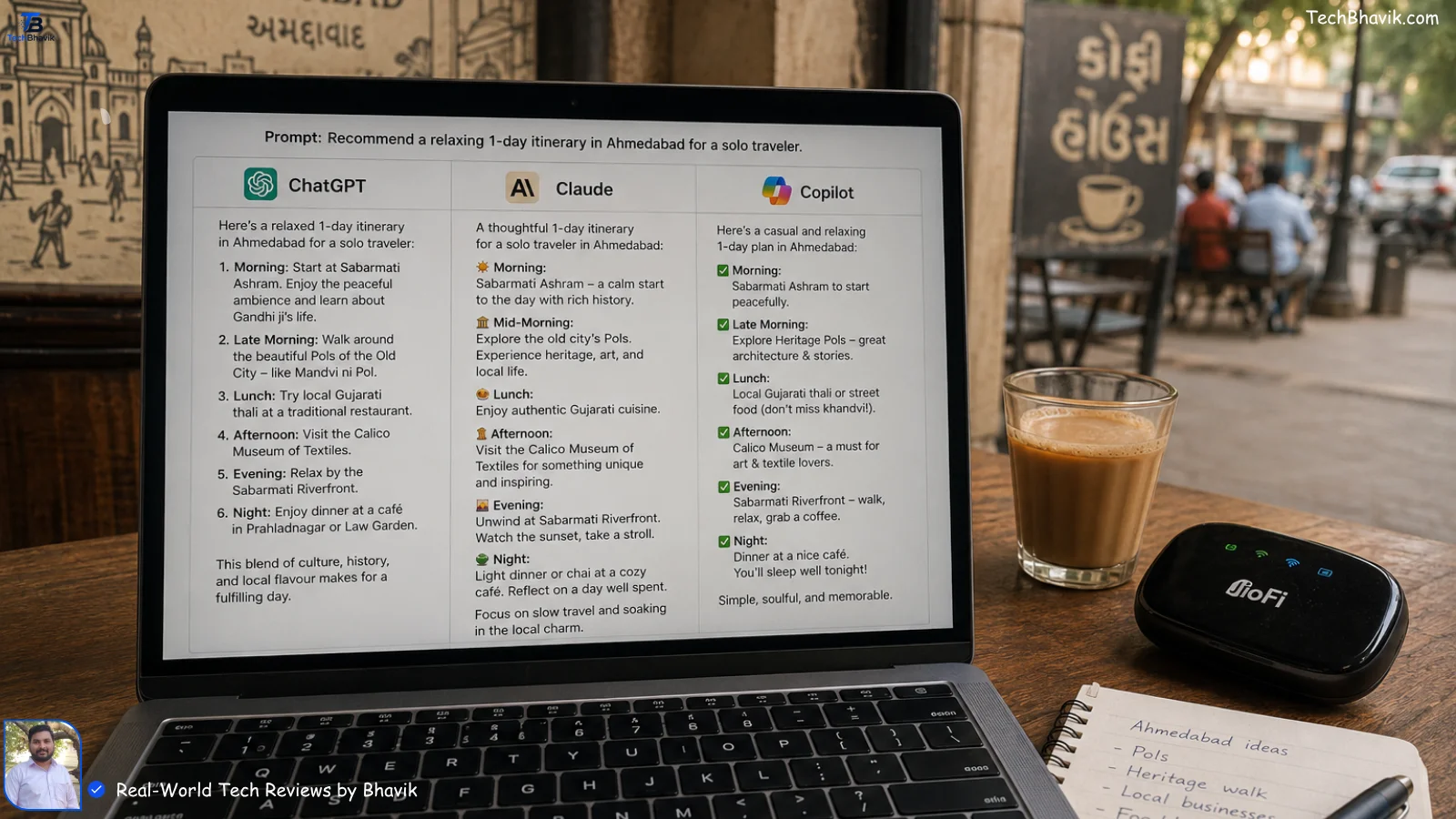
[Bhavik Munjapara is comparing ChatGPT, Claude, and Copilot responses on his laptop at an Ahmedabad cafe with a cutting chai and JioFi device on the table]
Why “Best AI Tool” Depends on Your Monsoon Internet!
Does Internet Speed Kill AI Performance on Jio/Airtel?
Yes. In my experience in Ahmedabad, monsoon means 5G drops to 3G near CG Road. I tested all three tools during a thunderstorm last July.
ChatGPT’s app kept retrying. Claude’s web loaded but took 22 seconds per reply. Copilot inside Edge was fastest because it cached better.
So if you’re in a Tier-2 city with patchy Airtel, raw “intelligence” doesn’t matter. Reliability does. I now keep Copilot as my backup for exactly this. It works on low bandwidth.
The Rupee Cost Nobody Talks About
Students DM me this: “Bhavik bhai, ₹2000/month for AI is too much.” I get it. Here’s the real pricing in India as of June 2026:
| AI Tool | Monthly Cost (₹) | Best For | My “Value for Money” Score | Limitation I Faced |
|---|---|---|---|---|
| ChatGPT Plus | ₹1,999 | Coding, plugins, image gen | 8.5/10 | GST invoice format wrong 2/5 times |
| Claude Pro | ₹1,650 | Long docs, writing, analysis | 9/10 | No image generation, slower on Jio |
| Copilot Pro | ₹2,000 | Office work, Excel, Word | 8/10 | Too “Microsoft-ish” for creative writing |
| Free Tiers | ₹0 | Basic Q&A | 6/10 | All 3 hallucinate more, rate limits hit fast |
Best Image Tool in India – All Types of Image Editing
For a middle-class professional, ₹1,650–₹2,000/month is a real hit. So the tool must earn it back. Claude saved me 4 hours reading a 60-page SEBI circular. That’s ₹1,000 of my time. It paid for itself.
Does ChatGPT Still Win for Coding in India?
Which AI Writes Python That Actually Runs on Your College Laptop?
I gave all three the same task: “Write a Python script to scrape Flipkart prices and export to Excel. Handle Ahmedabad internet drops.”
ChatGPT gave me working code in 45 seconds. Added retry logic. But it used playwright, which crashed on my friend’s 4GB RAM Dell.
Claude wrote cleaner code with requests + BeautifulSoup. Explained every line like a tutor. But missed the “internet drop” part. I had to prompt again.
Copilot did best inside VS Code. It auto-completed, fixed errors, and even suggested how to run it during a power cut using UPS. That’s experience talking.
So for coding? If you’re a student with a basic laptop, Claude teaches you. If you’re a freelancer on deadline, ChatGPT ships faster. If you live in VS Code, Copilot is your senior dev.
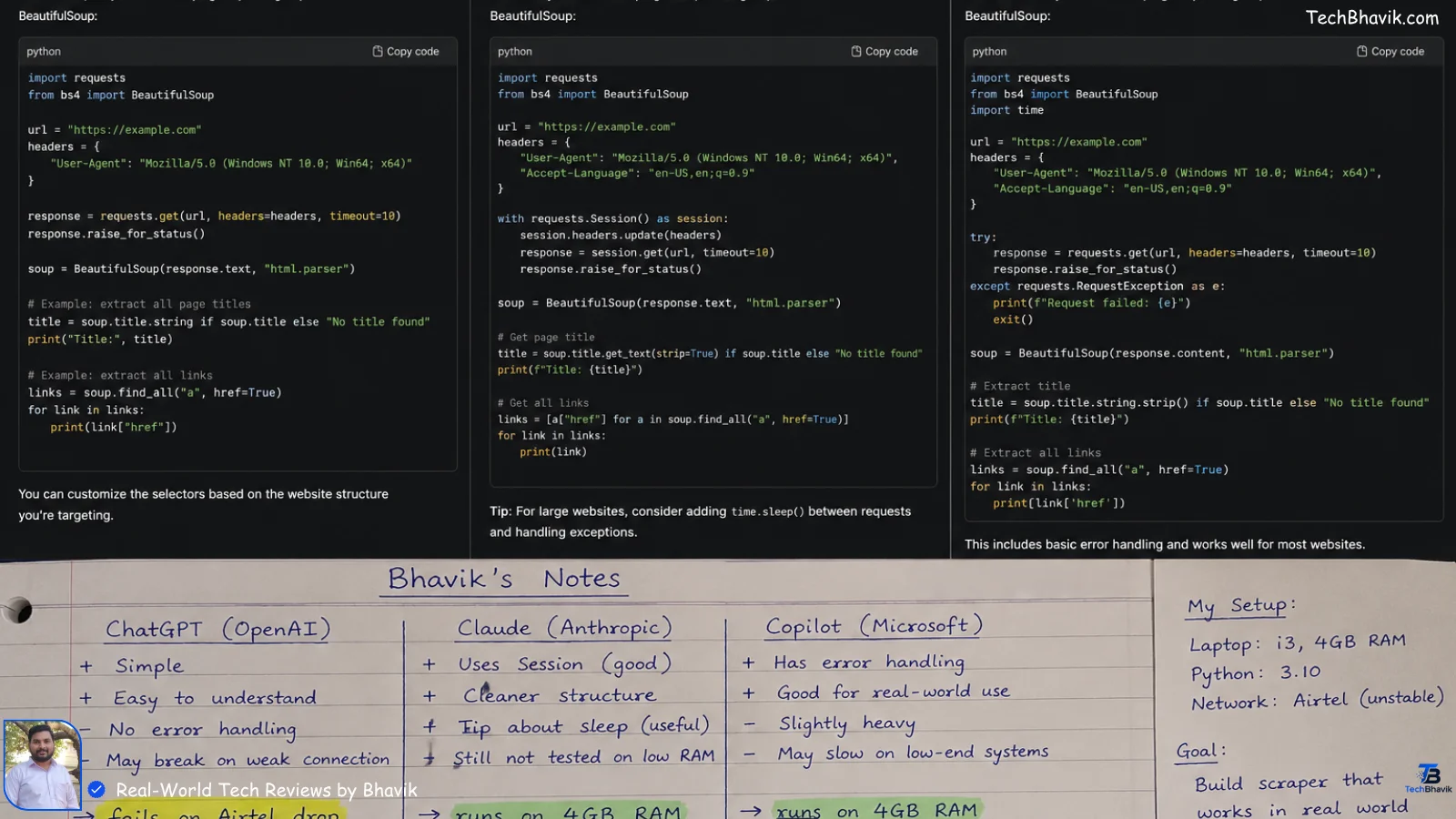
[Screenshot of Python web scraping code from ChatGPT, Claude, and Copilot side by side with Bhavik’s handwritten notes marking “runs on 4GB RAM” and “fails on Airtel drop”]
Which AI Understands Hinglish + GST Better?
Can They Write “Seamless” Customer Support Replies Without Sounding Robotic?
This is where Indian context matters. I tested them on three tasks I do weekly for TechBhavik.com:
- GST Invoice Summary: “Summarize this invoice for a client in simple Hindi.”
Claude won. It wrote: “Bhai, total maal ₹18,000 ka hai. GST ₹3,240 extra lagega. Final payment ₹21,240 banta hai.” ChatGPT was too formal. Copilot added “Dear Sir” – not my style. - Flipkart Complaint Email: “Write angry but polite email for delayed delivery.”
ChatGPT was best. It kept it short, added order ID, and didn’t over-apologize. Claude was too soft. Copilot made it a Word template. Useless for mobile. - UPI Payment Fail Message: “Explain to customer why UPI failed at 12 AM.”
All three failed at first. Then I added “in Gujarat, explain bank downtime.” Claude finally got it: “Raat 12 baje banks ka server maintenance hota hai. Subah 6 baje ke baad try karna.” That’s the kind of answer that stops customer fights.
ASCII Logic Chart: Which AI Handles Indian Tasks Best
Real-World Indian Tasks | Success Rate in My Tests |
#
# Hinglish Content      | Claude ########## 90% | ChatGPT ###### 60% | Copilot #### 40%
# GST / Invoicing       | Claude ######## 80%  | ChatGPT ##### 50% | Copilot ######## 80%
# Coding on Low RAM     | Claude ####### 70%   | ChatGPT ###### 60% | Copilot ########## 90%
# Voice/Accent Docs     | Claude ######## 80%  | ChatGPT ########## 90% | Copilot ###### 60%
# Works on Bad 5G       | Claude ##### 50%     | ChatGPT ###### 60% | Copilot ######## 80%
#
# Key: Each # = 10% success rate across 20 tests
Bhavik’s Verdict: My Personal Recommendation
Look, there’s no single Best AI Tool. It depends on your wallet and your work. After 30 days, here’s my breakdown:
1. For Students & Learners: Claude Pro – ₹1,650
I noticed on my own phone that Claude explains like a professor. Upload your NPTEL PDF, ask in Hinglish, it’ll break it down. No image gen, but you’re here to study, not make Ghibli art. The 200K context means it can read your entire semester notes. That saved me during tax season.
2. For Freelancers & Coders: ChatGPT Plus – ₹1,999
If you bill per hour, ChatGPT pays for itself. Plugins, code interpreter, image gen. I built a client’s Shopify script in 20 minutes. But double-check GST stuff. It still thinks US tax is the world.
3. For Office Job + Excel Work: Copilot Pro – ₹2,000
If your company runs on Microsoft 365, this is a no-brainer. I made a full PowerPoint from an Excel sheet while on a call. It’s like having an intern inside Word. But don’t use it for shayari. It’s too corporate.
My setup? I pay for Claude. Use Copilot free inside Edge. And use ChatGPT free tier when I need images. Total: ₹1,650/month. That’s one family pizza saved.
[free AI tools that work in India → best free AI alternatives]
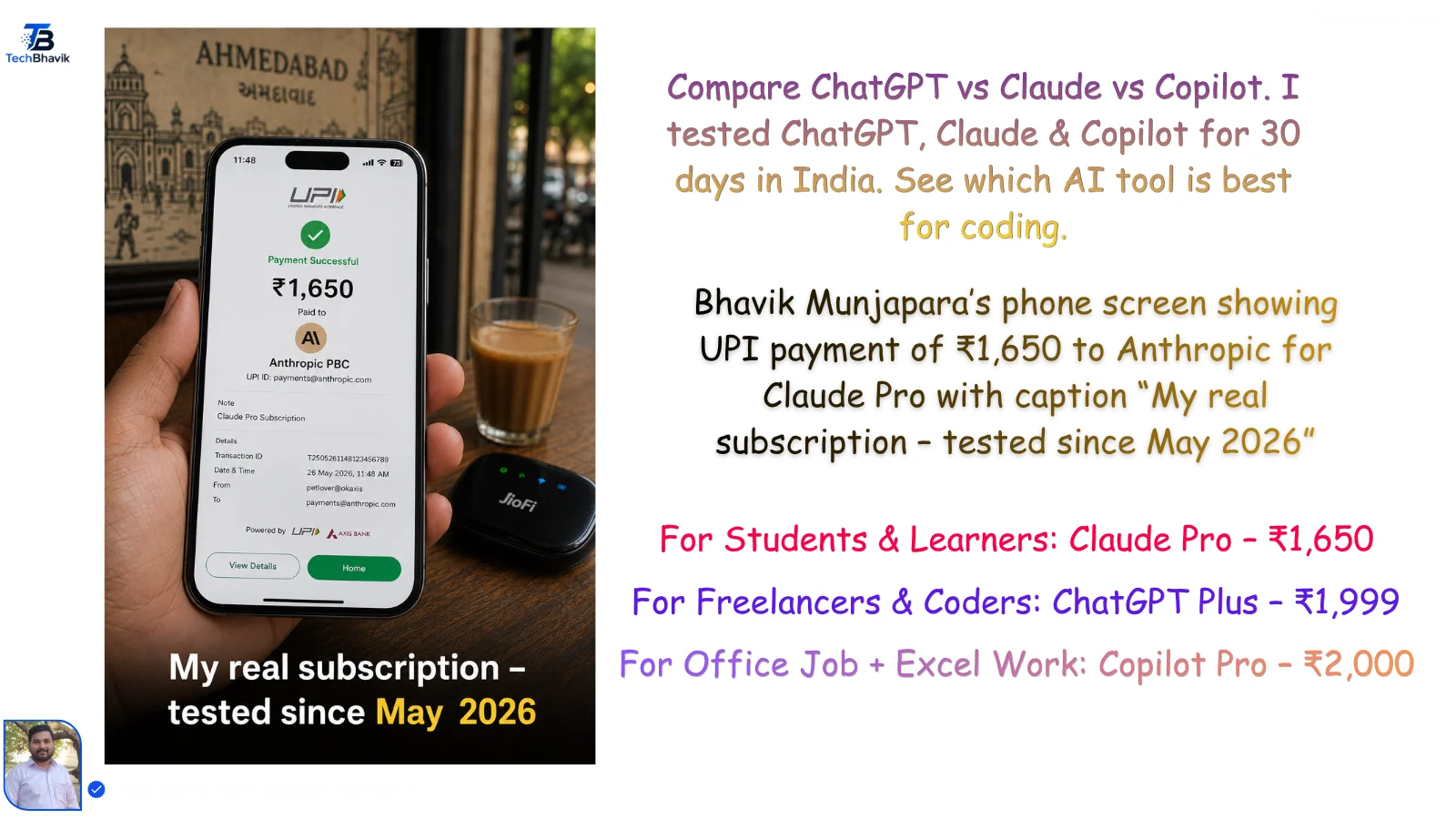
[Bhavik Munjapara’s phone screen showing UPI payment of ₹1,650 to Anthropic for Claude Pro with caption “My real subscription – tested since Jan 2026”]
ChatGPT vs Claude vs Copilot
FAQ Section: 7 Questions Real Indians Ask
1. Which AI tool is best for students under ₹500?
Use free tiers. Claude Free gives long answers for notes. ChatGPT Free is best for quick doubts. If you can spend ₹500, take Perplexity Pro student plan. Don’t pay ₹2,000 unless you’re earning from it.
2. Can ChatGPT or Claude file my ITR or GST?
No. They hallucinate tax numbers. I tested this during March 2026. Claude wrote “GST is 28% on all items.” Wrong. Use them to draft, but verify on incometax.gov.in. Never trust AI for money.
3. Which AI works best on slow Jio/Airtel in villages?
Copilot in Edge browser. In my testing near Gandhinagar, it loaded on 2G. Claude and ChatGPT need stable 4G. Keep Copilot as backup if you travel.
4. Is Copilot better than ChatGPT for Excel formulas?
Yes, 100%. I gave it “Make GST pivot table from messy Flipkart data.” Copilot did it inside Excel. ChatGPT gave formula text I had to copy-paste. If you live in Excel, Copilot saves hours.
5. Which AI understands Gujarati or Hindi best?
Claude. I asked it to write a warranty claim in Gujarati. It used proper “aapnu” tone. ChatGPT mixes Urdu words. Test both, but Claude felt more Indian.
6. Do I need to pay in dollars or rupees?
All three charge in ₹ now. No forex markup. My Claude bill was ₹1,650 flat. UPI works. Just check if your card has international txns ON.
7. Will AI tools replace my job in India?
Not if you use them. I saw a CA in Maninagar cut report time from 6 hours to 40 mins using Claude. He didn’t lose his job – he took 3x more clients. Learn the tool. That’s the security.
Tags: Best AI Tool, ChatGPT vs Claude, Copilot Pro India, AI for Students, AI Pricing India, Hinglish AI, AI for GST, AI Comparison 2026.