
Motorola Android 17 Update Is More Than a Visual Refresh
Your Motorola phone is about to feel noticeably different.
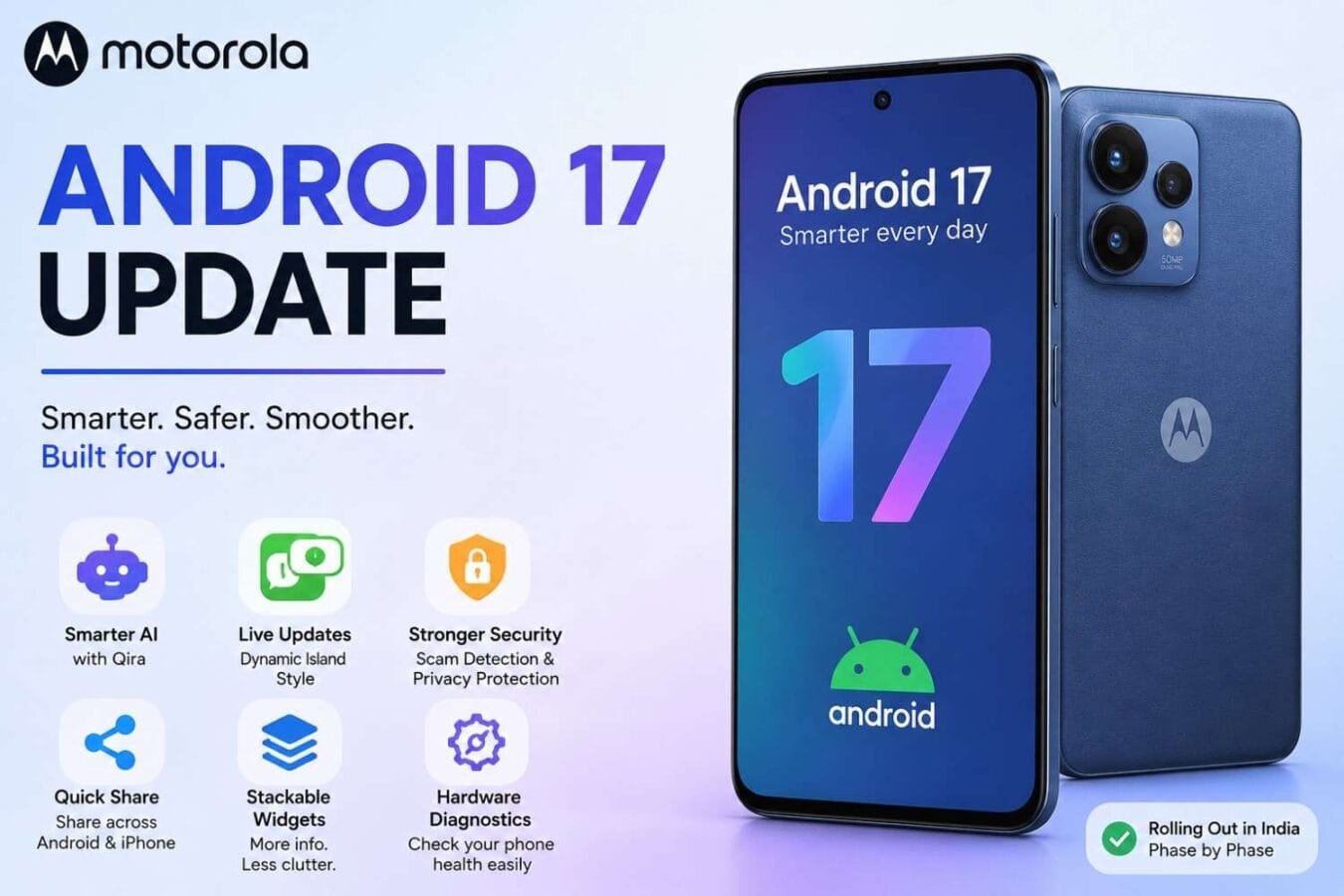
- Motorola started rolling out Android 17 in India, beginning with its flagship Signature series before expanding the update to other eligible smartphones in phases. The update brings changes to HelloUI, notifications, connectivity, AI features, security and everyday phone management.
- I have always felt that a major Android update is most useful when it improves the little things you touch dozens of times every day—not just when it changes an icon or wallpaper.
- That is exactly where Motorola’s Android 17 update looks interesting.
- You get redesigned Quick Settings, stackable widgets, improved Live Updates, new sharing tools, hardware diagnostics, enhanced scam protection and several HelloUI-specific changes.
- And yes, Motorola is also experimenting with a Dynamic Island-style Live Updates experience around the front camera on supported devices.
What Are the Biggest Motorola Android 17 Features?
Motorola’s official Android 17 support information confirms several major changes, while the company’s rollout information and beta testing reveal additional HelloUI improvements.
Here are the features that matter most.
1. Dynamic Island-Style Live Updates
This is probably the feature most people will notice.
Motorola’s Android 17 beta introduces Live Updates that can appear around the camera cutout, creating an experience similar in concept to Apple’s Dynamic Island. The feature is designed to keep ongoing information visible without filling your notification shade with repeated alerts.
For example, instead of receiving multiple updates for an ongoing activity, compatible apps can maintain a single live notification.
Motorola’s official Android 17 documentation also confirms that Live Updates can continuously update an ongoing snippet in the status bar or notification area.
The exact visual treatment may vary between Motorola models.
2. Qira Brings a New Moto AI Experience
Motorola’s Android 17 beta has also introduced a new Moto AI assistant called Qira.
This is particularly interesting because Motorola is moving beyond simple voice commands toward an AI layer integrated into the phone experience. Beta testers have reported Qira alongside other HelloUI changes.
The bigger question isn’t simply whether Qira exists.
It’s how useful it becomes in everyday situations.
For example, an assistant that can understand what you’re doing on the phone and help with information, tasks or device functions could be much more useful than another chatbot sitting inside an app.
Motorola still has plenty to prove here, though. AI features can differ considerably by device, region and software version.
3. Quick Settings Gets a Major Makeover
Motorola is refreshing its Quick Settings interface with larger touch targets and redesigned navigation.
Beta testers have also reported resizable Quick Tiles, new Wi-Fi, mobile-network and battery icons, plus a refreshed control-center experience.
This might sound minor, but Quick Settings is something I use constantly.
Turning on mobile data, changing brightness, enabling hotspot or checking connectivity should take seconds—not several taps through different menus.
Motorola is also allowing users of the Classic Quick Settings style to hide tile labels, freeing up additional screen space.
4. Stackable Widgets Finally Make the Home Screen Cleaner
This is one of my favourite practical additions.
Android 17 lets Motorola users stack multiple widgets into one block.
You could combine:
- Weather
- Calendar
- Battery
- Music controls
- Other compatible widgets
Instead of filling half the home screen with individual boxes, you can swipe through the widget stack.
Motorola also mentions interactive widgets with snap-scrolling, making it easier to navigate information in smaller spaces.
For users who like a clean home screen, this is much more useful than a purely cosmetic redesign.
5. Themed Icons Give HelloUI a More Consistent Look
Android 17 also adds themed icon support.
Motorola’s support documentation says users can enable coordinated icon themes from:
Home screen → Home settings → Themed icons.
This helps make third-party application icons fit better with the rest of the interface.
Motorola beta testers have additionally reported that app icons can appear tinted across the interface.
6. Notifications Become Much Smarter
Notifications are another area Motorola is improving.
Android 17 introduces Notification Summaries, which can provide a short summary of long conversations or rapidly changing message threads.
Motorola also says notifications can be automatically organised, with machine learning helping separate lower-priority automated alerts from more important personal messages.
That could be a big deal for Indian smartphone users.
Think about a normal workday:
WhatsApp messages, bank alerts, shopping notifications, food-delivery updates, UPI messages, promotional SMS and dozens of app notifications can quickly overwhelm the notification shade.
A better notification system means less scrolling and less mental clutter.
7. Quick Share Can Work With iPhone Users
- How to Update Windows: 5 Fixes for Stuck Updates in 2026
- Jio 5G vs Airtel 5G: The Shocking Indoor Coverage Reality No One Tells You

Here’s one of the more interesting connectivity improvements.
Motorola’s Android 17 rollout includes a cross-platform Quick Share option that can generate a QR code. Someone using an iPhone or another non-Android device can access the shared files through a web interface.
This doesn’t magically turn Quick Share into Apple’s AirDrop.
But it addresses a common problem: sending a large photo or video to someone who isn’t using Android.
For family groups, work teams and mixed-device households, that’s genuinely useful.
8. Instant Hotspot Makes Tethering Easier
Android 17 also adds Instant Hotspot, designed to simplify the process of connecting compatible devices to your phone’s hotspot.
There’s also Nearby Audio Streams, which can allow audio to be broadcast to compatible nearby receivers.
These are the kinds of features that don’t look exciting in a launch presentation but can become extremely useful once you start using them.
9. Built-In Hardware Diagnostics Could Save You a Trip to the Service Centre
Motorola is adding a hardware diagnostics hub that can check individual components and provide device telemetry locally.
This is particularly valuable when troubleshooting a phone.
If your speaker suddenly becomes quiet, a sensor behaves strangely or another hardware component stops responding properly, diagnostic tools can help determine whether the problem is software-related or potentially hardware-related.
For consumers, that can make troubleshooting much easier.
10. Circle to Search Gets Live Translation
Google’s Circle to Search is becoming more useful in Android 17.
Motorola’s update supports real-time on-screen translation through the visual search interface.
Imagine reading a webpage, product listing or image containing another language.
Instead of copying text into a translation application, you can interact directly with the content on screen.
For people who regularly browse international websites, travel or communicate across languages, this is a meaningful productivity improvement.
11. Android 17 Adds Automated Scam Protection
Security is arguably the most important part of this update.
Motorola says Android 17 introduces automated scam protection that can scan incoming SMS, MMS and RCS messages for potential phishing attempts.
This matters in India, where SMS-based scams can imitate banks, delivery companies, government services and financial platforms.
A warning before tapping a suspicious link can potentially prevent a much bigger problem.
However, there is a privacy question worth asking.
Motorola’s published information doesn’t fully explain where all message scanning takes place or what data is processed. I would personally check the feature’s settings and permissions once the update reaches the phone.
12. Failed Authentication Lock Strengthens Phone Security
Android 17 also brings stronger protections against repeated authentication attempts.
Motorola lists:
- Failed Authentication Lock
- Stronger PIN protections
- Reduced visibility of sensitive lock-screen notifications
These measures are designed to make it harder for someone who has physical access to your phone to repeatedly guess credentials or view private information.
Google also says Android 17 strengthens lost-device protection through improved Find Hub and Mark as lost capabilities.
13. Enhanced HDR Brightness Gives You More Control
HDR content can sometimes push a phone’s display to extremely high brightness levels.
Android 17 introduces Enhanced HDR brightness control, allowing users to limit the intensity rather than always letting HDR content use the display’s maximum capability.
This could be useful when watching HDR video at night or viewing bright HDR photographs indoors.
It also gives users more control over battery consumption and viewing comfort.
14. Motorola Improves Haptics and the HelloUI App Drawer
Motorola’s Android 17 beta testing has uncovered several smaller HelloUI changes.
These include:
- Stronger and improved haptic feedback
- Refined app-opening animations
- Better app-drawer background blur
- 3×3 folder grid
- New folder creation option
- Tinted app icons
- Updated settings interface
- Pixel-inspired volume controls
Beta testers have also reported changes to the notification system and Smart Connect integration.
These aren’t headline-grabbing features, but together they can make the phone feel newer.
15. Three-Finger Gestures Become More Useful
Some beta reports point to easier gestures for common actions.
A three-finger swipe down can be used for screenshots, while a three-finger swipe up can activate split-screen functionality.
If Motorola keeps these gestures in the stable builds for supported devices, they could become one of those features you don’t appreciate until you’ve used them for a few weeks.
What Does Android 17 Mean for Performance?
Android updates aren’t just about new menus.
Google says Android 17 introduces memory-management improvements, including app memory limits designed to prevent individual apps from consuming excessive RAM. The goal is better overall performance and potentially improved battery behaviour.
Motorola also says system upgrades can improve stability, compatibility and performance.
But I wouldn’t expect Android 17 to magically turn a mid-range Motorola into a flagship.
The processor, RAM, storage speed and thermal design still matter.
The real benefit is better utilisation of the hardware you already own.
- Pixel 10a specs table with Tensor G4, 8GB RAM and 256GB storage

- Vivo V80 5G India Launch: What We Know So Far

Which Motorola Phones Are Getting Android 17?
Motorola’s published eligibility information includes devices from its Signature, Razr, Edge and Moto G families.
Examples include:
Motorola Signature
- Motorola Signature
Motorola Razr
- Razr 70 Ultra
- Razr 70 Plus
- Razr 70
- Razr Ultra 2026
- Razr Plus 2026
- Razr 2026
- Razr Fold 2026
- Razr Fold 2025
- Razr 60 Ultra
- Razr 60
- Razr 2025
- Razr 50 Ultra
Motorola Edge
- Edge 2026
- Edge 70 series
- Edge 2025
- Edge 60 Pro
- Edge 60 Fusion
- Edge 60
- Edge 50 Ultra
Moto G
- Moto G Max
- Moto G87
- Moto G86
- Moto G86 Power
- Moto G77
- Moto G77 Power
- Moto G67
- Moto G57
- Moto G57 Power
- Moto G47
- Moto G37
- Moto G37 Power
Motorola is rolling out Android 17 in batches, so being eligible doesn’t necessarily mean you’ll receive it on the same day as another owner with the same Android phone. Region and carrier approvals can affect timing.
There are also some inconsistencies in Motorola’s published eligibility list, so owners of models near the edge of the list should verify their device through Motorola’s own software-update information rather than relying solely on third-party lists.
My Real-World Take: What Would I Notice First?
If I were using a Motorola phone after installing Android 17, I wouldn’t start by opening the Settings app and hunting for every new option.
I’d use it normally.
In the morning, I’d check WhatsApp and email, use UPI, browse Chrome and connect to mobile data.
Later, I’d use Google Maps, Bluetooth earbuds and YouTube, followed by some gaming.
That’s where the update should prove itself.
The things I’d watch most closely are notification organisation, haptics, battery behaviour, Live Updates and thermal performance.
A software update is successful when you stop thinking about it and simply notice that the phone feels easier to use.
A Practical Case Study: Android 17 on a Daily Indian Smartphone
Imagine someone using a Motorola Edge phone for work.
During the morning, dozens of WhatsApp and email notifications arrive. Android 17’s notification summaries and organisation can reduce the clutter.
At lunch, the user needs to send several high-resolution photos to an iPhone user. The new cross-platform Quick Share option can make that easier.
In the evening, the user receives a suspicious SMS pretending to be from a financial service. Scam detection may flag the message before the user opens its link.
And while watching an HDR video at night, Enhanced HDR brightness control can prevent the screen from becoming unnecessarily bright.
None of these features individually changes the smartphone experience.
Together, they can.
Should You Install Motorola Android 17 Immediately?
If the stable update is already available for your phone, I would generally recommend installing it—but with one basic precaution.
Back up important data first.
For beta software, I would be much more cautious.
Beta builds can contain bugs, increased battery drain or unexpected behaviour. Some Motorola beta testers have even reported that their phones felt warmer after installing Android 17 beta.
For a primary phone used for banking, UPI and work, I’d prefer the stable release.
Before updating:
- Back up important photos and files.
- Charge the phone sufficiently.
- Use Wi-Fi for the large download.
- Make sure you have enough storage.
- Install the update through Settings → System → System updates when officially offered.
Motorola Android 17: Pros and Cons
Pros
- Better notification management
- Stackable and interactive widgets
- Improved Live Updates
- Dynamic Island-style experience on supported Motorola phones
- New Qira AI experience
- Cross-platform Quick Share
- Instant Hotspot
- Hardware diagnostics
- Better scam protection
- Stronger authentication security
- Enhanced HDR brightness controls
- Improved haptics and HelloUI refinements
Cons
- Features can vary by Motorola model
- Rollout is phased
- Some AI features may depend on region or device
- Beta software can have bugs
- Motorola’s eligibility communication has shown some inconsistencies

Final Verdict: Is Motorola Android 17 Worth Getting Excited About?
Yes—but mainly because of the practical improvements.
Motorola isn’t simply changing the wallpaper and calling it a major update.
Android 17 brings useful additions such as smarter notifications, stackable widgets, improved sharing, hardware diagnostics, scam detection, better security and enhanced HDR controls. Motorola’s own HelloUI layer adds another collection of changes, including Live Updates, Qira AI, redesigned controls and stronger haptics.
My favourite part is that several of these features solve everyday problems.
The cross-platform sharing is useful. Notification summaries are useful. Hardware diagnostics are useful. Better security is useful.
That’s the kind of update I want.
The only thing I’d advise users to watch is rollout timing and device eligibility. Motorola is deploying Android 17 in phases, and its published device list has had some inconsistencies.
If your Motorola phone receives the stable Android 17 OTA, I’d recommend installing it after a backup.
For beta builds, I’d wait unless you’re comfortable troubleshooting software issues.
Frequently Asked Questions
When is Motorola Android 17 rolling out in India?
Motorola has started the Android 17 rollout in India in phases, beginning with the Signature series and expanding to other eligible devices. Exact timing varies by model, region and carrier.
What are the biggest new Motorola Android 17 features?
The major additions include improved Live Updates, stackable widgets, themed icons, notification summaries, cross-platform Quick Share, Instant Hotspot, hardware diagnostics, Circle to Search translation, scam detection and stronger authentication security.
Will Motorola Android 17 have a Dynamic Island?
Motorola’s Android 17 beta has introduced a Dynamic Island-style Live Updates interface around the front camera cutout on supported devices. The exact experience can vary by model and software build.
What is Qira on Motorola phones?
Qira is a new Moto AI assistant reported in Motorola’s Android 17 beta. It is part of Motorola’s expanded AI experience, although availability and capabilities can vary by device and region.
How do I check whether my Motorola phone has Android 17?
Open Settings → System → System updates and check for an available update. Motorola is distributing Android 17 in batches, so an eligible phone may receive the update later than another model or region.
Is Android 17 a major update for Motorola?
Yes. Beyond Google’s Android 17 platform changes, Motorola’s HelloUI implementation adds substantial interface, notification, AI, connectivity, diagnostics and security improvements.
Quick Summary
Motorola Android 17 = better notifications + smarter AI + improved security + new sharing + cleaner HelloUI + Live Updates + useful everyday tools.
For existing Motorola owners, this is an update worth watching closely.
- Best WordPress Hosting in India: Hostinger vs GoDaddy, Compared on Price, Renewals and Features

- Lexar 4TB NM790 SSD Drops in Price again -Now at its lowest in four months

Source: Commenting on the announcement, T.M. Narasimhan, Managing Director, Motorola India.